

AVAYA DOCUMENTATION CENTER
Find answers to your technical questions and learn how to use our products
Administering Avaya Breeze® platform
Adding a data source in System Manager
- On the System Manager web console, navigate to .
- Add a new data source and enter the following LDAP server details, and click Test Connection.
ADDITIONAL INFORMATION:
-
DS Name
-
Host
-
Principal
-
Port
-
Base DN
-
LDAP User Schema
-
Search Filter
-
Use SSL: Select the check box.
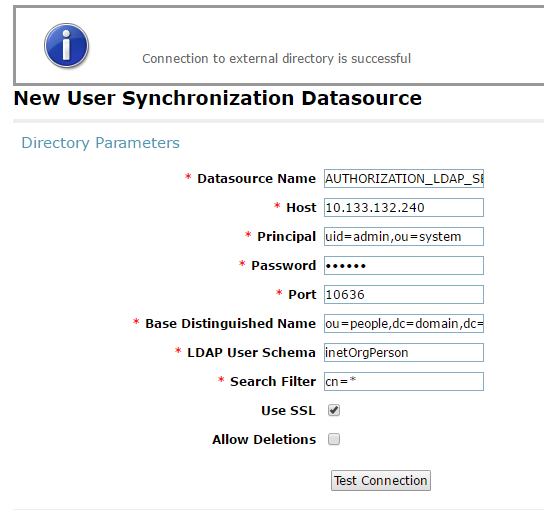 Upon successful connection with the LDAP server, mapping attributes would be displayed.
 -
- Map the LDAP Server attributes with corresponding System Manager attributes and save.
ADDITIONAL INFORMATION:
description         -->  SourceUserKey
 mail                -->  loginName
 sn                  -->  surname
 givenName           -->  givenName
 displayName         -->  displayName