

AVAYA DOCUMENTATION CENTER
Find answers to your technical questions and learn how to use our products
Administering Avaya IP Office™ Platform Media Manager
Media Manager Architecture
The diagram below shows of simplified summary of the architecture of Media Manager operation.
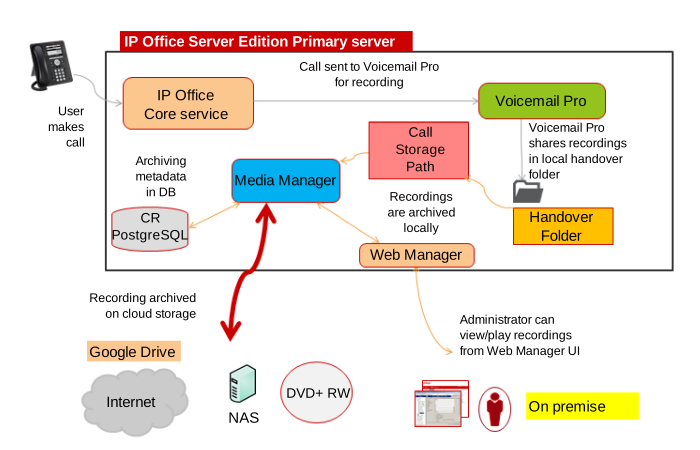
The IP Office system requests that Voicemail Pro records the call.
IP Office can automatically trigger recording for specific users, groups, incoming call routes, or account codes.
Voicemail Pro can trigger recording as part of a voicemail callflow.
Users can manually trigger recording.
The call recording configuration settings indicate the destination for recordings. That is either a voicemail mailbox or Media Manager (using the setting Voice Recording Library).
Voicemail Pro records the call. For recordings where the destination is set as Voice Recording Library, the recording is placed into a handover folder.
The Media Manager service constantly checks the handover folder:
Whenever a new recording is available, Media Manager moves the recording to its call storage folder. That can be a local hard drive or a folder in cloud-based storage.
Media Manager adds details of the call to the Media Manager database.
System administrators can access recordings using Web Manager. They can configure user access to recordings using the IP Office user portal application.
If Media Manager has been configured with an external connector, it copies new recordings to the external location.