

AVAYA DOCUMENTATION CENTER
Find answers to your technical questions and learn how to use our products
Using IP Office System Monitor
Blacklisted IP Addresses
This menu displays IP addresses that are currently blacklisted by the system. Blacklisting is typically applied after 10 failed access attempts. The IP address remains blacklisted for 10 minutes from the last failed access attempt.
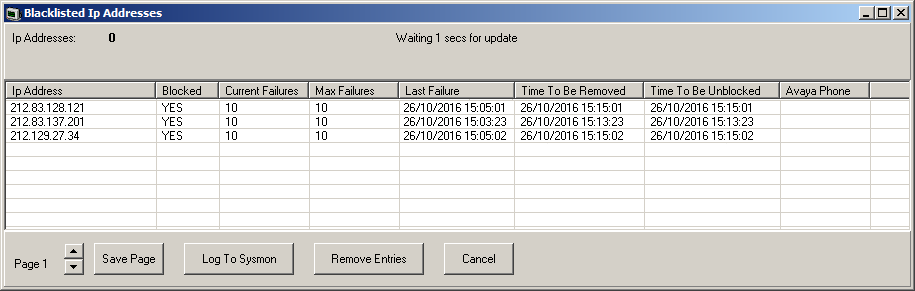
When an address becomes blocked, the system generates an alarm in System Status Application application and adds an entry to its audit log. A system alarm is also generated and can be output using any of the configurable system alarm routes (Simple Mail Transfer Protocol (SMTP), Simple Network Management Protocol (SNMP), Syslog).
An IP address can become blacklisted for the following reasons:
Extension registration blacklisting |
An extension that has repeatedly attempted to register an non-existing extension or to register an existing extension with the wrong password. When blacklisted, further registration attempts are ignored even if they use the correct parameters. Note that the extension number of a phone attempting to register can also become blocked, see Blacklisted extensions
|
Application blacklisting |
An application trying to connection on port 443 or 8443 has repeatedly entered the wrong password. That can apply, for example, to web manager, system status and system monitor connections. When blacklisted, further connected attempts are ignored.
|
Session Initiation Protocol (SIP) Invite blacklisting |
Repeated SIP invites to an unregistered extension.
|
Excessive SIP traffic blacklisting |
IP address blacklisting can be applied when the number of SIP messages (all types) from the same address exceeds a set rate. The default rate is 100,000 messages in 100 milliseconds. Unlike the other blacklistings, this blacklisting can only be manually removed.
|
Columns
IP Address |
The IP address |
Blocked |
Indicates whether the extension is now blocked from registering for exceeding the number of failed registration attempts. |
Current Failures |
The number of registration attempt failures. |
Max Failures |
The number of registration failures at which the extensions can be blocked. |
Last Failure |
The date and time of the last failed registration attempt. |
Time To Be Removed |
The date and time at which the extension, if not blocked, it is removed from the blacklist if there are no further failed registration attempts. |
Time To Be Unblocked |
The date and time at which the blocked extension is unblocked and removed from the blacklist. For non-Avaya phones this will extend if the extension attempts to re-register again before this time. |
Avaya Phone |
Indicates whether the extension is recognized as being an Avaya phone. |
Protocol |
The connection protocol being used by the phone or application that is now blocked. For example; H.323, SIP or HTTP.
|
Client Name |
The client name of the blocked application. |
Save Page |
Save the current status menu data to a text file in comma separated format. |
Log To Sysmon |
When selected, the information is added to the Syslog monitor log. A comma separated row is added to the log output for each current entry. |
Remove Entries |
Remove the current blacklist entries. This allows to attempt to reregister again without having to wait for the expiry of their previous blacklisting. |
Cancel |
Close the status menu. |