

AVAYA DOCUMENTATION CENTER
Find answers to your technical questions and learn how to use our products
Using IP Office System Monitor
Quarantined Phone Status
This menu displays phones that have previously been registered but are now blocked from re-registering because another phone has subsequently registered using the same registration parameters. This blocked state is called quarantined.
For example: When a user who has an already registered on one phone then registers on another phone using the same parameters, the previous phone may automatically attempt to reregister itself. In that case, even though the previous phone is presenting correct registration details, its registration is blocked and it is quarantined.
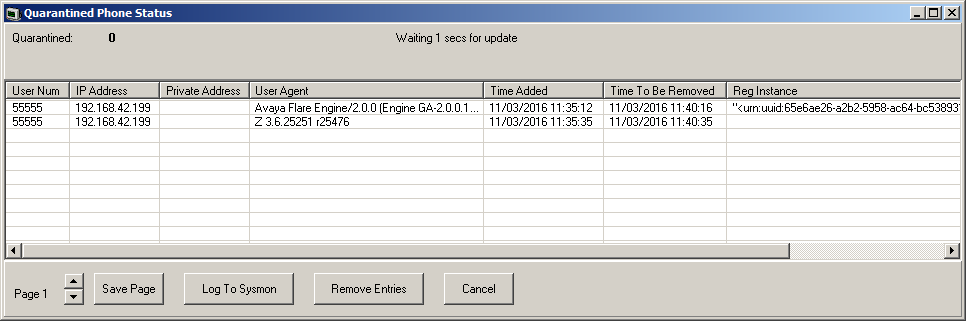
The default quarantine time is five minutes. However, if the phone keeps on trying to reregister, its quarantine time is extended. Most phones eventually cease attempting to automatically re-register.
Quarantining is treated separately from blacklisting since the phone has been previously registered with correct authentication parameters.
Quarantining honors the restrictions for simultaneous telephony device use by users. For example, such users can simultaneously register one physical deskphone (including SIP, H.323 and DECT), one desktop PC VoIP client, one mobile VoIP client and one WebRTC client.
Columns
User Num |
The extension number. |
IP Address |
The phone's public IP address. |
Private Address |
The phone's private IP address. |
User Agent |
The device type string. This can help identify the phone type. |
Time Added |
The date and time when phone was added to the quarantined phones list. |
Time To Be Removed |
The current date and time when the phone will be removed from the quarantined phones list. This will extend if the phone attempts to re-register again before this time. |
Reg Instance |
For SIP phones, the protocol parameter used during registration. This can be useful to distinguish between simultaneous phones where whilst 'roaming' and changing the IP address the instance remains fixed. |
Reg ID |
N.A |
Buttons
Save Page |
Save the current status menu data to a text file in comma separated format. |
Log To Sysmon |
When selected, the information is added to the Syslog tracing. A comma separated row is added to the log output for each current entry. |
Remove Entries |
Remove the current quarantined entries. This allows them to attempt to reregister again. |
Cancel |
Close the status menu. |