

AVAYA DOCUMENTATION CENTER
Find answers to your technical questions and learn how to use our products
Maintenance Procedures for Communication Manager, Branch Gateways and Servers
Resolving a user reported problem
Use this procedure to resolve a reported problem of a user within the system.
- After you have collected the required information about the reported problem. Look up connection/configuration information (status station) as shown in the figure through the figure.
ADDITIONAL INFORMATION:Note:Different fields might appear on this screen, and some fields might appear on different pages depending on your system configuration. The figure is an example only.
Figure: Status station form, page 1 
- Perform the following to resolve the issue:
- Ensure that the value in Service State field is in-service.
- Check the extension number in the Extension field.
- Write down the Port assignment.
- Scroll to the GENERAL STATUS section of the form.
ADDITIONAL INFORMATION:
Figure: Status station form, page 2 
- If the user-report is that the station cannot be called or does not ring, ensure the following:
ADDITIONAL INFORMATION:
-
Ensure that the CF Destination Ext field is blank.
-
Ensure that the SAC Activated field is set to no.
-
Ensure that the Ring Cut Off Act field is set to no.
-
Ensure that theUser Cntrl Restr and Group Cntrl Restr fields are set to none. This controlled station restriction can render the station outgoing- or incoming-restricted, or completely disabled (both outgoing- and incoming-restricted).
-
Ensure that the User DND and Group DND options are not activate.
-
- Is the Station Lock Active field no? If yes, proceed; if no, unlock the extension (change the field to no) and try a call from it.
- Scroll to UNICODE DISPLAY INFORMATION section of the form.
ADDITIONAL INFORMATION:
Figure: Status station form, page 3 
- Scroll to ATM VPI.VCI DATA section of the form.
ADDITIONAL INFORMATION:
Figure: Status station form, page 4 
- Scroll to CALL CONTROL SIGNALING section of the form.
ADDITIONAL INFORMATION:
Figure: Status station form, page 5 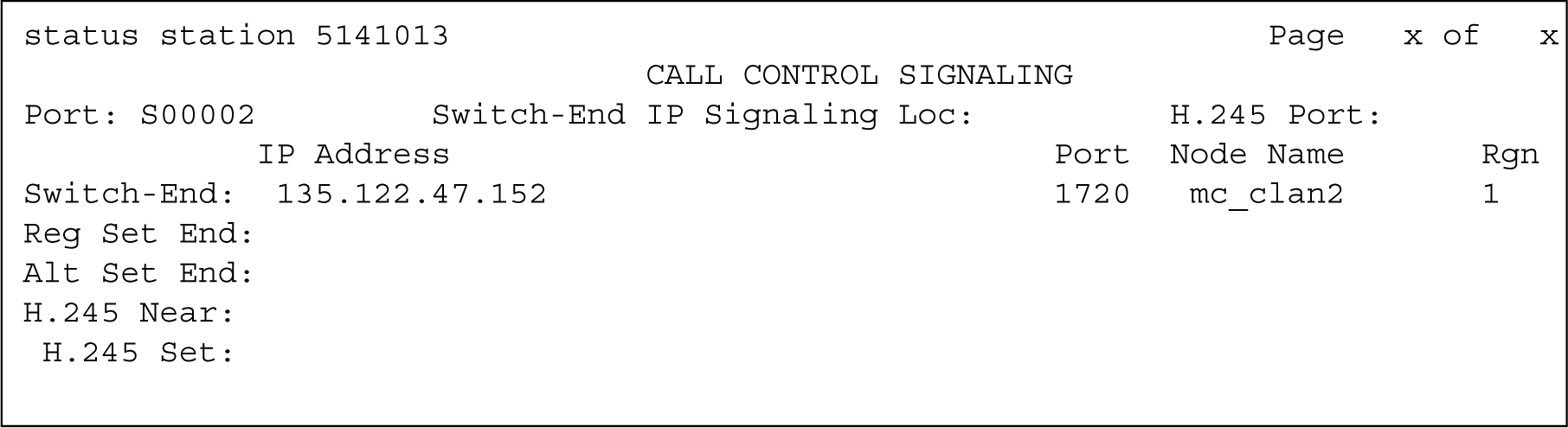
- If this is an IP endpoint, note down Switch Port, Switch-End IP Address:Port, and Set-end IP Address:Port fields information.
- Scroll to Audio section of the form.
ADDITIONAL INFORMATION:
Figure: Status station form, page 6 
- Check the Audio Connection Type field (ip-tdm).
- Scroll to IP ENDPOINT DATA section of the form.
ADDITIONAL INFORMATION:
Figure: Status station form, page 7 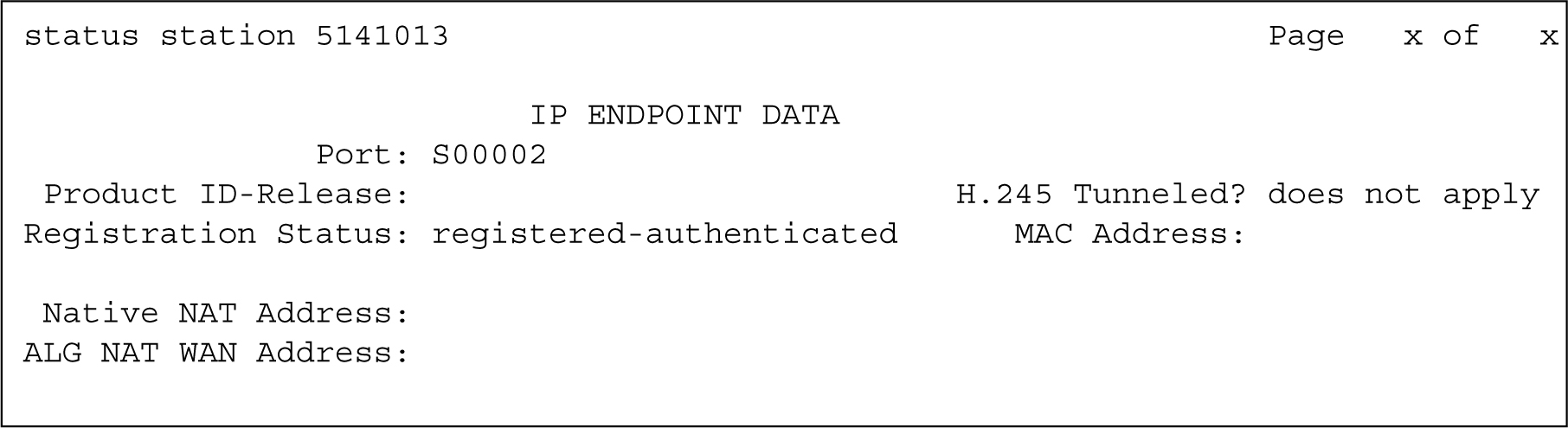
- Check the Registration Status field (registered-authenticated).
- Scroll to ACD STATUS section of the form.
ADDITIONAL INFORMATION:
Figure: Status station form, page 8 
- Through your understanding of your system’s configuration, try to determine what part(s) of the system might be affected.