

AVAYA DOCUMENTATION CENTER
Find answers to your technical questions and learn how to use our products
IP Office SIP Telephone Installation Notes
Using web manager to upload files
Within IP Office Web Manager you can use file manager to view files and if necessary upload new files.
Before you begin
This process is not supported in Chrome.
- Log into the system using IP Office Web Manager.
- Click Applications and select File Manager.
ADDITIONAL INFORMATION:
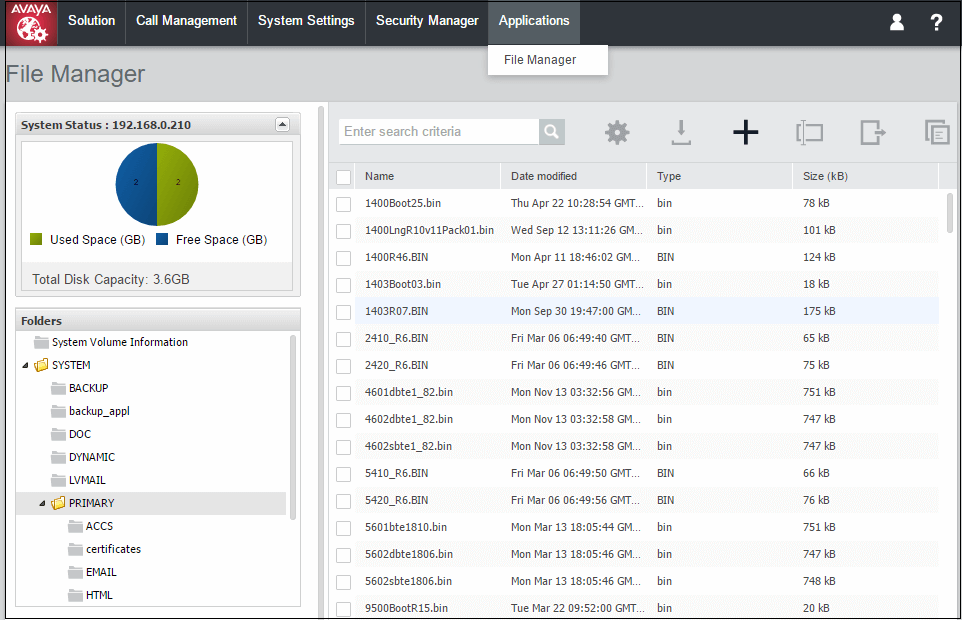
- Open the /system/primary or /disk/system/primary folder.
- Click on the + icon to upload a new file.
- Browse for and select the file to upload. Click Upload File.