

AVAYA DOCUMENTATION CENTER
Find answers to your technical questions and learn how to use our products
IP Office SIP Telephone Installation Notes
Changing the system default codec preferences
By default, all VoIP extensions added to the configuration use the system's default codec preferences. This is shown by the Codec Selection settings on the individual IP trunk or extension being set to System Default.
For most installations these settings do not need to be changed, however it is important to understand how the options are set and used by the system.
-
Whilst the codec preferences used by an individual trunk or extension can be adjusted, the use of the system default settings is strongly recommend to ensures codec consistency between the trunks and extensions involved in any call. This helps minimizes the need for the system to use additional system resources such as VCM channels. It also allows the use of options such as direct media connection during calls.
- Using either IP Office Manager or IP Office Web Manager in offline mode, load the system configuration.
- Select or .
- Select VoIP.
ADDITIONAL INFORMATION:
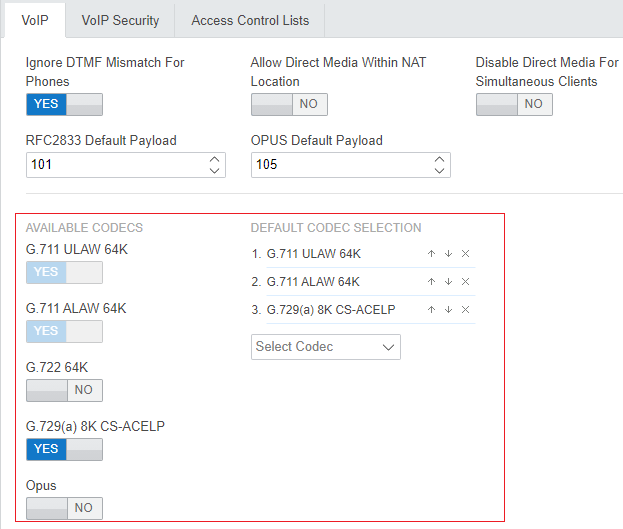 STEP RESULT:
 - The DEFAULT CODEC SELECTION section is used to set the default codec preference order. This is used by all IP (H323 and SIP) extensions and lines on the system that have their Codec Selection setting set to System Default. This is the default for all newly added IP extension and lines.
ADDITIONAL INFORMATION:
-
The AVAILABLE CODECS list displays the codecs the system supports.
-
G.723/G.729b: These codecs are only supported on IP500 V2 systems.
-
Opus: This codec is not supported by IP500 V2 systems.
-
-
Unlike H323 IP devices which always support at least one G711 codec, SIP devices do not support a single common audio codec. Therefore, it is important to ensure that any SIP device is configured to match at least one system codec configured on the system.
-
On system's with B199 phones, the codec used for calls affects the maximum number of participants supported in conferences hosted by the phone. See B199 Notes.
-
Deselecting a codec automatically removes it from any line, system or extension codec list that are using it.
-
- If these settings need to be changed, do so and then save the configuration back to the system.