

AVAYA DOCUMENTATION CENTER
Find answers to your technical questions and learn how to use our products
Avaya CMS Supervisor Report Designer
Format
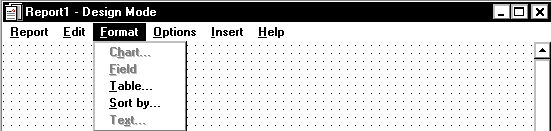
The following is a description of the Format menu.
Name |
Description |
|---|---|
Chart |
Opens the Chart Format Options window. Use this window to format charts on reports. For more information about the Chart Format Options window, see The Format | Chart menu option. |
Field |
Opens the Field Format Options window. Use this window to format fields defined in queries. For more information about the Field Format Options window, see The Format | Field menu option. |
Table |
Opens the Table Format Options window. Use this window to format tables on reports. For more information on the Table Format Options window, see The Format | Table menu option. |
Sort by |
Opens the Table Format Options window with the Sort by tab active. Use this window to access the General and Sort by tabs to format tables on reports. For more information on the Table Format Options window, see The Format | Table menu option. |
Text |
Opens the Text Format Options window when a text item on the report is selected. Use this window to change the font display characteristics for the selected text. For more information on the Text Format Options window, see The Format | Text menu option. |