AVAYA DOCUMENTATION CENTER
Find answers to your technical questions and learn how to use our products
Avaya CMS Supervisor Report Designer
Setting up inputs for a multi-ACD report
About this task
Use this procedure to create a multi-ACD report. Make sure that you set up the inputs as detailed in this procedure so that the query for the report will work properly.
The following instructions use the split/skill multi-ACD report inputs as an example. To create the inputs for a VDN multi-ACD report, use the same instructions, but use the VDN input instead of the Split/Skill input.
Procedure
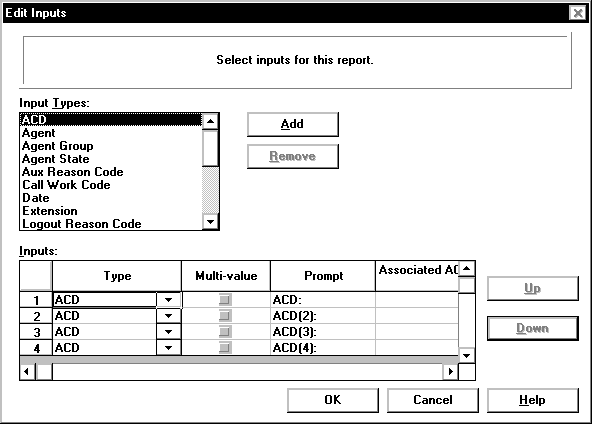
- Repeat Steps 2 and 3 three times.
The Inputs table will have three more ACD entries that are followed by numbers:
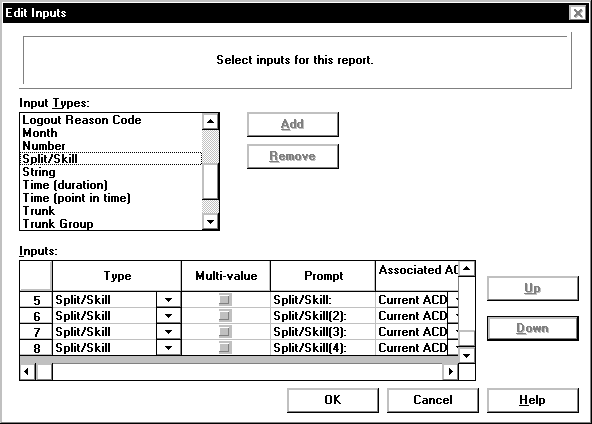
- Repeat Steps 5 and 6 three times.
The Inputs table will have four split/skill entries that are followed by numbers:
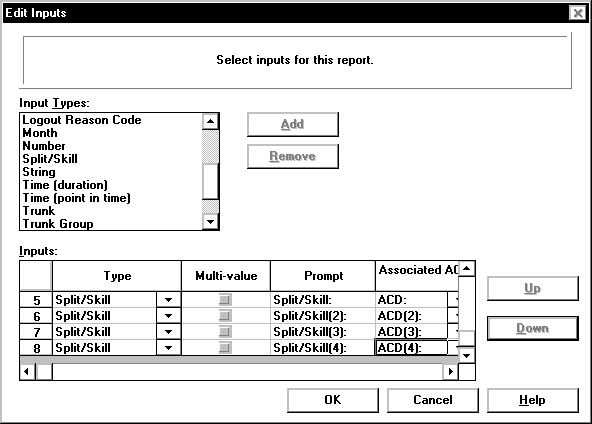
- For the Split/Skill(4) prompt on line 8 of the Inputs table, use the Associated ACD drop-down list to select ACD(4) as the associated ACD.
The Inputs table will have each split/skill matched to the corresponding ACD: