

AVAYA DOCUMENTATION CENTER
Find answers to your technical questions and learn how to use our products
Avaya CMS Supervisor Report Designer
General tab
Use the General tab to make table format changes to gridlines, column and row scrolling, and orientation.
Example
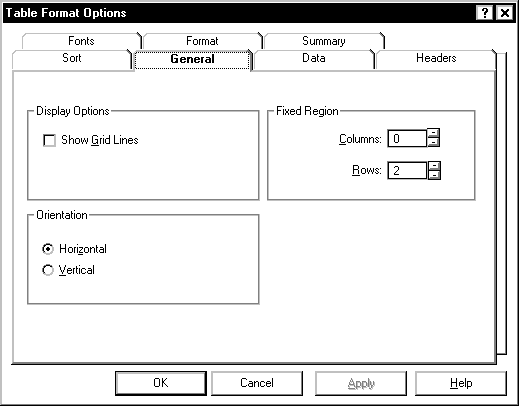
General tab options
You can change the following table parameters.
Name |
Description |
|---|---|
Show Gridlines |
This specifies whether grid lines are shown in the table. |
Fixed Columns |
This specifies the number of columns from the left of the table that are fixed in place and do not scroll. Valid values are in the range of 0 through 99. You can use the spin boxes to select a valid value or you can manually enter the value. |
Fixed Rows |
Specifies the number of rows from the top of the table that are fixed in place and do not scroll. Valid values are in the range of 0 through 40. You can use the spin boxes to select a valid value or you can manually enter the value. |
Orientation - Horizontal |
Builds the table with the column names across the top of the table, so that the table reads from left to right. Vertical builds the table with the column names down the left side of the table, so that the table reads from top to bottom. |