

AVAYA DOCUMENTATION CENTER
Find answers to your technical questions and learn how to use our products
Using IP Office System Status
Active Calls
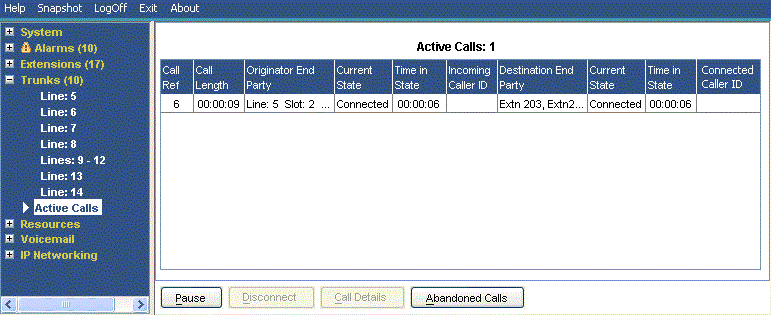
The Active Calls screen provides a summary of all the calls in the system. From the navigation panel, click Active Calls:
|
Information Displayed
|
Description
|
|---|---|
|
Call Ref
|
Call reference for incoming trunks, assigned by the system and associated with the line in use.
|
|
Call Length
|
Total length of the call.
|
|
Originator End Party
|
Trunk or 'Currently At' information. See Call Details.
|
|
Destination End Party
|
Trunk or 'Currently At' information. See Call Details.
|
Buttons
The following buttons can appear on this screen:
|
Button
|
Description
|
|---|---|
|
Call Details
|
Displays call details for the selected call, trunk or trunk channel.
|
|
Resume
|
Resumes updating screen in real time. When pressed, the button label and function changes to Pause.
|
|
Pause
|
Stops the screen from updating. The button label and function changes to Resume when the screen is paused.
|
|
Call Details
|
Displays call details for the selected call, trunk or trunk channel.
|
|
Abandoned Calls
|
The Active Calls screen splits to display a list of incoming calls on a trunk where the caller disconnected before the call was first answered.
|