

AVAYA DOCUMENTATION CENTER
Find answers to your technical questions and learn how to use our products
Using IP Office System Status
Directory
Path:
This screen shows information about the directory entries held by the system including imported directory entries.
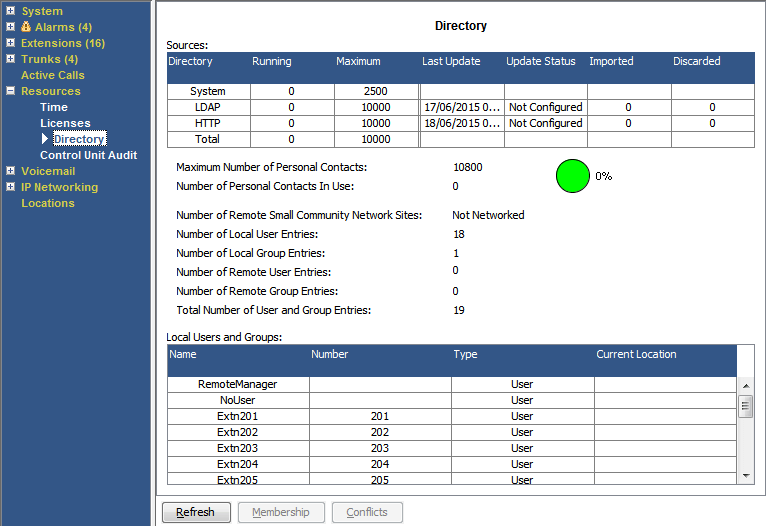
Information Displayed
|
Information
|
Description
|
|---|---|
|
Sources
|
This part of the table indicates the directory sources the system is using.
|
|
Running
|
The number of directory entries.
|
|
Maximum
|
The maximum capacity of such directory records that the system will allow. Note that System source entries have priority over imported LDAP/HTTP entries.
|
|
Last Update
|
The last time the Update Status was changed. Shown for LDAP and HTTP sources only.
|
|
Update Status
|
The status or result of the last update. Shown for LDAP and HTTP sources only.
|
|
Imported
|
The number of entries imported during the last successful update. Shown for LDAP and HTTP sources only.
|
|
Discard
|
The number of entries discarded, due to being invalid or duplicate, during the last successful update. The system discards records if they have a blank name or number, they match an existing record or then exceed the total capacity of the system. Shown for LDAP and HTTP sources only.
|
Buttons
The following buttons can appear on this screen:
|
Button
|
Description
|
|---|---|
|
Refresh
|
Updates the screen. This button appears on screens that do not update automatically.
|
|
Membership
|
Display the users who are members of the selected hunt group.
|
|
Conflicts
|
Displays any conflicts with directory entries on other systems if in a multi-site network.
|