

AVAYA DOCUMENTATION CENTER
Find answers to your technical questions and learn how to use our products
Using IP Office System Status
Status (Digital Trunk)
Path:
Access this menu by clicking Trunks on the navigation panel. Alternatively, click System and then Control Unit and double-click the line.
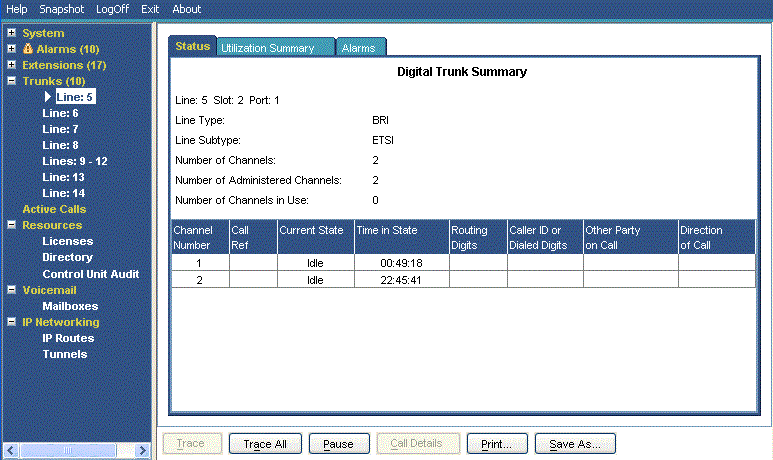
Information Displayed
|
Name
|
Description
|
|---|---|
|
Line/Slot/Port
|
The line, slot and port number.
|
|
Line Type
|
See Line Protocols.
|
|
Line Subtype
|
See Line Protocols.
|
|
Number of Channels
|
The number of channels the trunk supports.
|
|
Number of Administered Channels
|
The number of channels configured as in service.
|
|
Number of Channels in Use
|
The number of channels currently in use.
|
|
Channels Table
|
See the Channels table below.
|
|
Other Party on Call
|
See the Other Party on Call table below.
|
|
Direction of Call
|
Displays the call as either Incoming or Outgoing.
|
Channels Table
This table displays the following details:
|
Element
|
Description
|
|---|---|
|
Channel Number
|
Click on the row to view details of the call.
|
|
Call Ref
|
Call reference, assigned by the system and associated with the line in use. When a trace is in progress, any calls on the trunk will show (i) next to the Call Ref. If you select Call Details while a trace is in progress, the screen remains unchanged and a pop-up window appears which contains details about the selected call. The pop-up shows the state of the call at the time of selection and does not update. See Trace.
|
|
Current State
|
The current state of the call associated with the button. See Call States (Trunk).
|
|
Time in State
|
Reset to zero each time there is a state change.
|
|
Routing Digits
|
The directed inward dialed digits that are sent by the central office.
|
|
Caller ID or Dialed Digits
|
The information displayed depends on the call direction.
|
Other Party on Call
Contains one of the following:
|
Where Call was Originated/Answered
|
Displayed Value
|
|---|---|
|
User
|
User name and number
|
|
VoiceMail Call flow
|
Start Point name
|
|
VoiceMail Box
|
Voicemail - user name or hunt group name of the mailbox
|
|
Data Service
|
RAS - service name
|
|
Conference
|
Conference name
|
|
Trunk
|
Line ID/URI Group/Channel number
|
|
Park Slot
|
Park Slot - when the other end has parked the call
|
|
Announcement
|
Announcement - the hunt group associated with the announcement number
|
|
Hunt Group
|
Hunt Group - name and number when a call is in a hunt group queue (not alerting)
|
Buttons
The following buttons can appear on this screen:
|
Button
|
Description
|
|---|---|
|
Call Details
|
Displays call details for the selected call, trunk or trunk channel.
|
|
Resume
|
Resumes updating screen in real time. When pressed, the button label and function changes to Pause.
|
|
Pause
|
Stops the screen from updating. The button label and function changes to Resume when the screen is paused.
|
|
Print...
|
Prints all information available in the current screen (including any information currently scrolled off).
|
|
Trace
|
Starts a trace of the rows selected. System Status displays a trace for each call associated with the selected trunk or extension. See Trace.
|
|
Trace All
|
Starts a trace for the whole trunk group or extension. System Status displays a trace for all calls associated with the trunk or extension. See Trace.
|
|
Save As...
|
Saves the information shown on the screen to a text file (TXT or CSV). You can only save trace screens as CSV text files.
|