

AVAYA DOCUMENTATION CENTER
Find answers to your technical questions and learn how to use our products
Installing the Avaya Solutions Platform 130 Series
Validating SSL certificate expiry
About this task
During the installation of KVM on RHEL 8.10, the system generates a self-signed certificate that contains localhost|asp130-r660xs as the common name. After you configure the hostname in the system, a mismatch between the hostname and the common name in the certificate occurs.
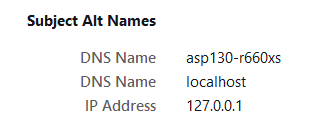
This procedure can also be used when a user generated self-signed SSL certificate installed in Cockpit is about to or has already expired.
Note:
This activity can be conducted 100% remotely and it is a NOT service affecting procedure for the virtual machines running on the KVM on RHEL 8.10 host. Nonetheless Avaya strongly recommends conducting this activity in a customer approved maintenance windows during off business hours when possible or low traffic hours.
Caution:
Avoid making configuration changes to the host when conducting this procedure.
Before you begin
Access to the ASP 130 R640/R660xs server management network either thru a SAL Gateway connection (remotely) or direct service port connection (onsite).
SSH tool i.e. Putty (not provided by Avaya).
custadm password.
Procedure
- Run the following commands to validate current SSL certificate expiry:
cd /etc/cockpit/ws-certs.d/ ls -lrt openssl x509 -in <*selfsigned.cert*> -noout -text | grep "Not After"Note:The 0-self-signed.cert certificate, is the default, system auto-generated certificate that gets installed during the KVM on RHEL installation. The same command can be executed for other certificates (if present) if the default one has been re-generated.
Example:
openssl x509 -in 0-self-signed.cert -noout -text | grep "Not After"

Or to see full certificate chain:
openssl x509 -in 0-self-signed.cert -noout -text
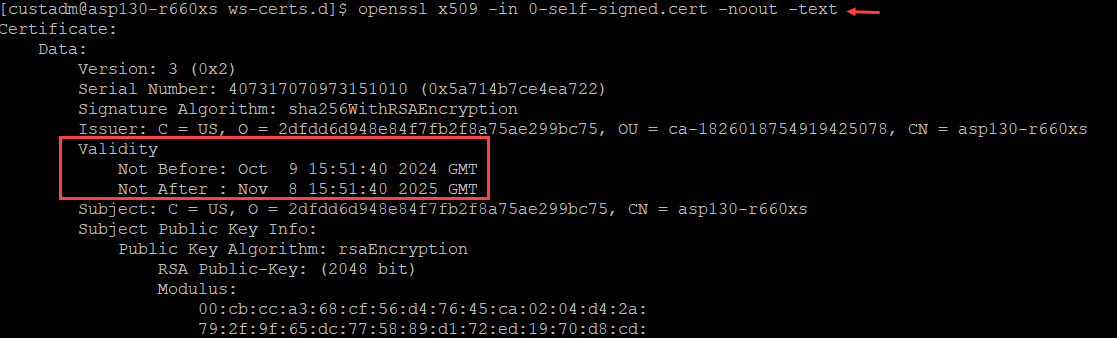
- If the “Not After” date displayed is older than the current KVM on RHEL 8.10 host date, proceed with re-generating the SSL Self-signed Certificate.
Output example:
Machine Date:
Thu Jul 22 13:07:12 UTC 2024
Validity
            Not Before: Jul 19 13:40:14 2023 GMT
            Not After : Jul 19 13:40:14 2024 GMT
Or to see full certificate chain:
openssl x509 -in 0-self-signed.cert -noout -text