

AVAYA DOCUMENTATION CENTER
Find answers to your technical questions and learn how to use our products
Installing the Avaya Solutions Platform 130 Series
Front view of Dell™ PowerEdge™ R640 Server
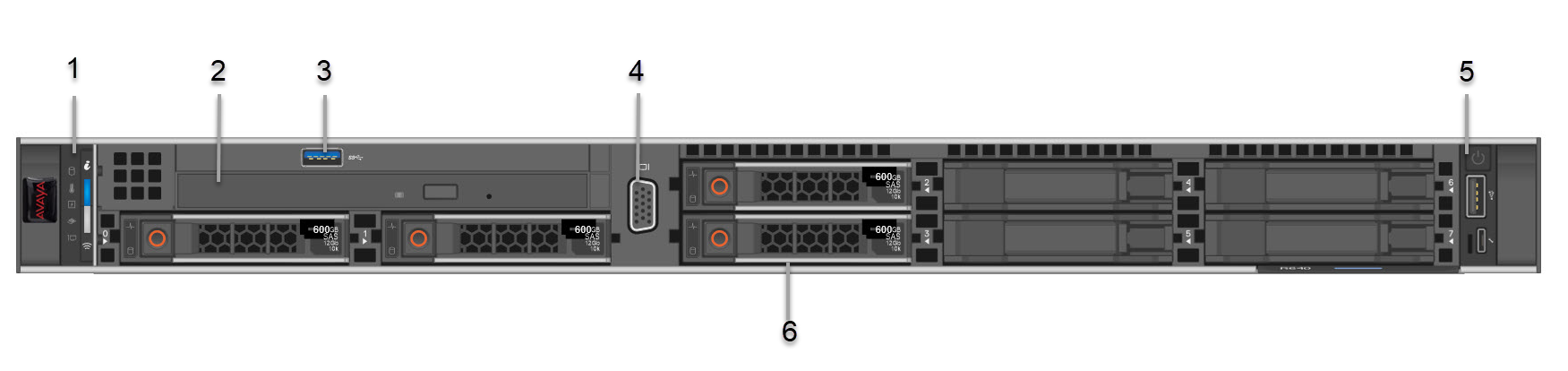
No. |
Item |
Icon |
Description |
|---|---|---|---|
1 |
Left control panel |
NA |
Displays the system health, system ID, and status LED indicators.
|
2 |
Optical drive |
N/A |
One slim SATA DVD-ROM drive.
Note:
DVD devices are data only. |
3 |
USB port |
 |
The USB port is USB 3.0 compliant. |
4 |
VGA port |
 |
Enables connection to the display device (console) of the system. |
5 |
Right control panel |
NA |
Contains the power button, USB port, iDRAC Direct micro port, and the iDRAC Direct status LED. |
6 |
Drive slots |
NA |
Enables installation of hard disk drives (HDDs) that are supported on your system. |