AVAYA DOCUMENTATION CENTER
Find answers to your technical questions and learn how to use our products
Installing the Avaya Solutions Platform 130 Series
Registering a new device
About this task
Use this task to register and onboard a new Avaya device. For more information, refer to HealthCheck Tool Registration Feature Description on https://support.avaya.com/css/public/documents/101067434.
Before you begin
Ensure that you have the following:
An SSO account with a valid user ID and password registered with Avaya to login.
A Location ID (FL Number) of the device that you want to register.
Note:US Sold To (functional location) location number format: 000XXXXXXX (000 + 7 digits or can be 00 + 8 digits as well).
Outside of US (Rest of the World) FL# (Ship To) location number: 00XXXXXXXX (always 00 + 8 digits).
The install base of the device that needs to be onboarded must be created in Siebel.
Note:Secure Access Link Registration (also called technical onboarding) requires a verified customer install base and FL or Sold to.
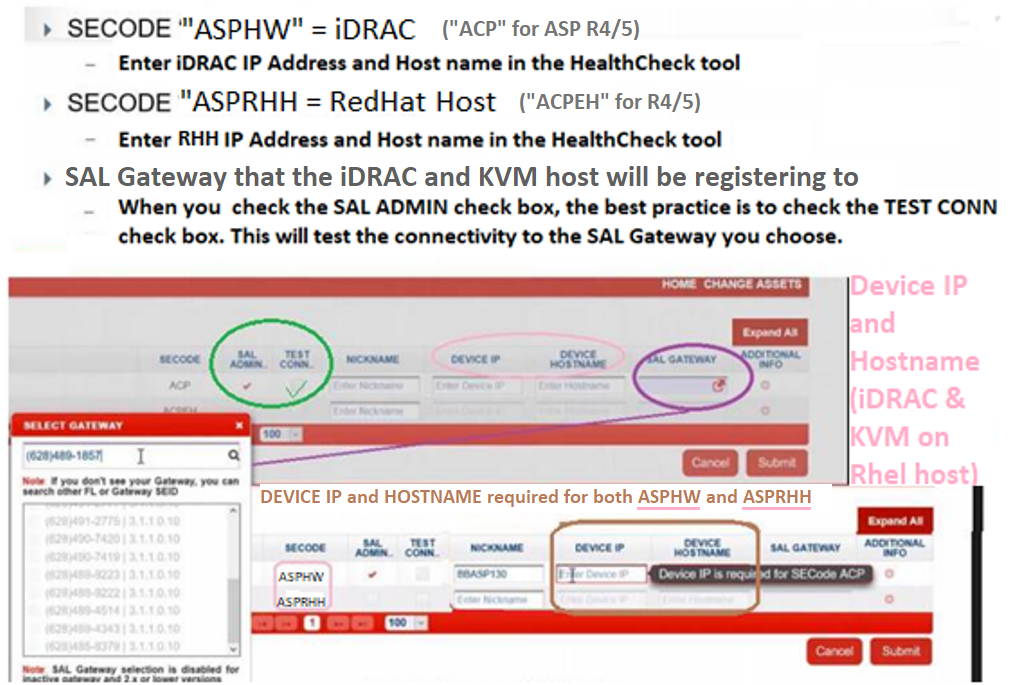
Ensure you have your IP address and host names for iDRAC and the KVM on RHEL host.
The iDRAC IP address is linked with the Avaya Solutions Platform server. The KVM on RHEL Host IP address is linked with the Avaya Solutions Platform KVM on RHEL host.
Ensure that you have placed a SAP order with the Avaya Solutions Platform 130 material codes.
The SAP order will automatically populate Assets under the GRT Install Base Creation.
The ASP 130 R6.0.x new material codes are the following:
700519836 ASP 130 DELL R660 HYPERVISOR A1 SERVER BUNDLE
700519837 ASP 130 DELL R660 HYPERVISOR A2 SERVER BUNDLE
700519838 ASP 130 DELL R660 HYPERVISOR A3 SERVER BUNDLE
700519839 ASP 130 DELL R660 HYPERVISOR A31 SERVER BUNDLE
Procedure
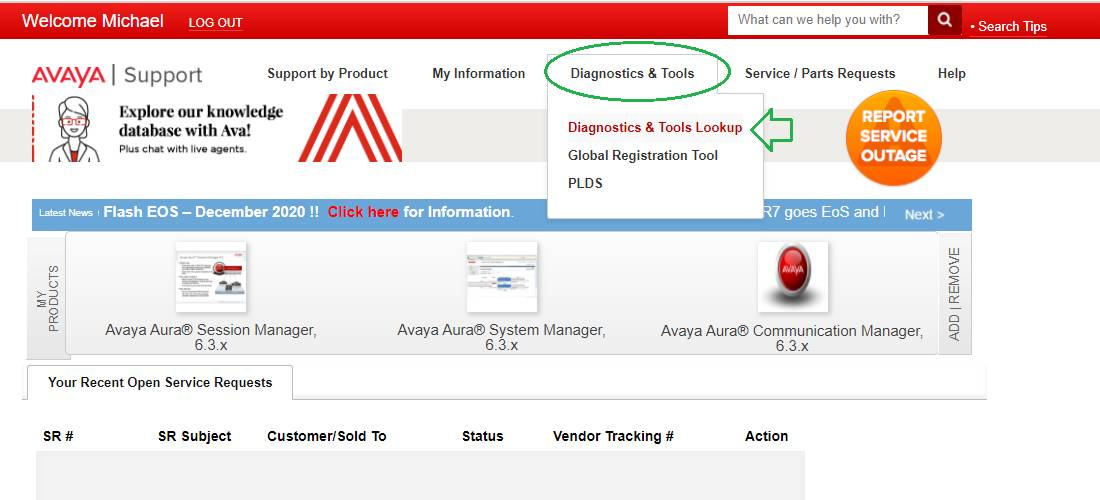
- On the Home page, click Diagnostic & Tools.
- Enter the details in the ASPHW, ASPRHH (R660xs), and SAL Gateway fields for the Avaya Solutions Platform 130.