

AVAYA DOCUMENTATION CENTER
Find answers to your technical questions and learn how to use our products
Installing the Avaya Solutions Platform 130 Series
Rear view of Dell™ PowerEdge™ R660xs Server
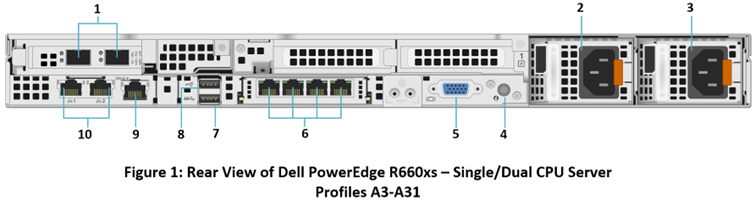
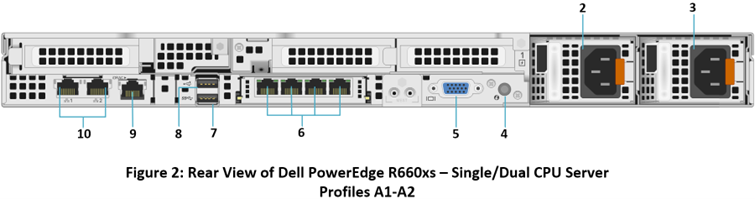
No. |
Item |
Icon |
Description |
|---|---|---|---|
1 |
PCIe expansion riser card 1 slot(1) |
N/A |
Avaya Solutions Platform 1XX systems with R660xs server have a 2x10/25 GbE Broadcom NIC installed (BCM57414) in PCIe slot 1. In KVM on RHEL 8.10 these network interfaces will be displayed as: ens1f0np0, ens1f0np1. (Right-to-left assignment if viewing from rear of the server). Available for use beginning with ASP R6.0.0.4.0 and with BIOS FW v2 or later. This Network Card is only populated in Profiles: A3-A31. |
2 |
Power supply unit (2) |

|
PSU1 is the primary PSU of the system. Can accept voltages from 100-240VAC. |
3 |
Power supply unit (2) |

|
PSU2 is the secondary PSU of the system. Can accept voltages from 100-240VAC. |
4 |
System identification button (ID) |
 |
Press the system ID button:
|
5 |
VGA port |
 |
Enables connection to the display device (console) of the system. If the user is connected to the front VGA port, the rear VGA port will not function. |
6 |
OCP NIC ports (4) |
N/A |
4x1 GbE OCP NIC card. (eno12399, eno12409, eno12419 and eno12429 – Left to right viewing from rear of the server). |
7 |
USB 3.0 port |
 |
This USB port is a 9 pin connector and 3.0-compliant. This port enables you to connect USB devices to the system (use for bootable ISO). |
8 |
USB 2.0 port |

|
This USB port is a 4 pin connector and 2.0-compliant. This port enables you to connect USB devices to the system. |
9 |
iDRAC9 dedicated port |
 |
If enabled and cabled allows you to remotely access iDRAC. |
10 |
NIC ports (2) |

|
2 x 1 GbE NIC ports integrated on the system mother board. (eno8303 {Management} and eno8403 {Services} ports) |