

AVAYA DOCUMENTATION CENTER
Find answers to your technical questions and learn how to use our products
Maintaining and Troubleshooting Avaya Solutions Platform 130 Series
Hard drive indicator patterns
Each hard drive carrier has an activity LED indicator and a status LED indicator. The indicators provide information about the current status of the hard drive. The activity LED indicator indicates whether the hard drive is currently in use or not. The status LED indicator indicates the power condition of the hard drive.
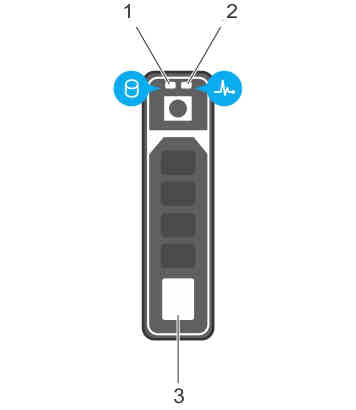
Indicator ID |
Description |
|---|---|
1 |
Hard drive activity indicator |
2 |
Hard drive status LED indicator |
3 |
Hard drive |
HDD LED indicator patterns
Sr. No. |
LED Pattern |
Condition |
|---|---|---|
1 |
Flashes green twice per second. |
Identifying drive or preparing for removal. |
2 |
Off |
Drive ready for insertion or removal.
Note:
The drive status indicator remains off until all hard drives are initialized after the system is turned on. Drives are not ready for removal during this time. |
3 |
Flashes green, amber, and then turns off. |
Predicted drive failure. |
4 |
Flashes amber four times per second. |
Drive failed. |
5 |
Flashes green slowly. |
Drive rebuilding. |
6 |
Steady green. |
Drive online. |
7 |
Flashes green for three seconds, amber for three seconds, and then turns off after six seconds. |
Rebuild stopped. |