

Replacing the H730P RAID battery

Last Updated : Nov 15, 2022 |

About this task

Use this procedure to replace the H730P RAID Battery.

Before you begin

Turn off the system including any attached peripherals and disconnect the system from the electrical outlet and peripherals. Shut down the server according to the Avaya application instructions.

Ensure to follow safe electrostatic discharge practices.

Procedure

  1. Open the system.
  2. Locate the PERC H730P card on the system board. Refer to the figure.
  3. Remove the H730P PERC card.
  4. Disconnect the battery cable from the PERC card.
  5. Pull the battery carrier until the tabs on the battery carrier are removed from the PERC card.
  6. Pull the battery out of the battery carrier.
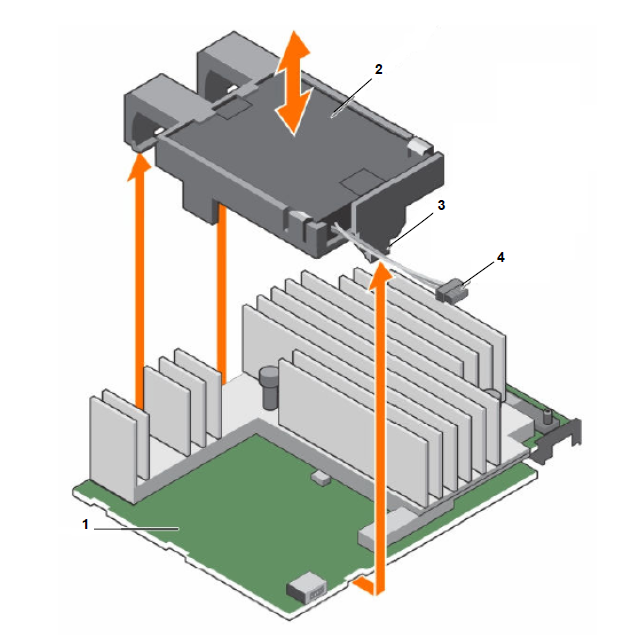
    Item

    Description

    1

    PERC H730P mini monolithic card

    2

    Battery

    3

    Tab on the battery carrier

    4

    Battery cable
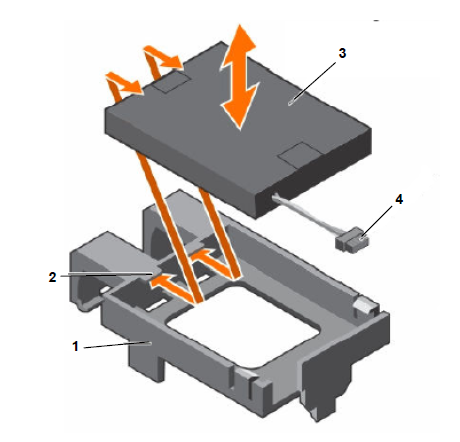
    Item

    Description

    1

    Battery Carrier

    2

    Guide on the battery carrier

    3

    Battery

    4

    Cable

  7. Place the replacement battery such that it aligns with the guides on the battery carrier.
  8. Lower the battery into the carrier until the battery is firmly seated.
  9. Align the tabs on the battery carrier with slots on the PERC 9 (H730P) mini monolithic controller and lower the battery carrier until the carrier is firmly seated.
  10. Connect the battery cable to the PERC card.
  11. Reinstall the PERC card and close the system.
  12. Reconnect the system to its electrical outlet and turn the system on, including any attached peripherals.