

AVAYA DOCUMENTATION CENTER
Find answers to your technical questions and learn how to use our products
Maintaining and Troubleshooting Avaya Solutions Platform 130 Series
1 GbE Network Interface Cards (NIC)
Symptoms
Network controller is installed but not working.
Network controller has stopped working.
NIC Indicator Codes
The NIC Indicator has two LED indicators.
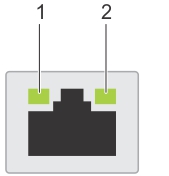
Link indicator
Activity LED indicator
Status |
Condition |
|---|---|
Link and activity indicators are off |
The NIC is not connected to the network. |
Link indicator is green and activity indicator is blinking green |
The NIC is connected to a valid network at its maximum port speed and data is being sent or received. |
Link indicator is amber and activity indicator is blinking green |
The NIC is connected to a valid network at less than its maximum port speed and data is being sent or received. |
Link indicator is green and activity indicator is off |
The NIC is connected to a valid network at its maximum port speed and data is not being sent or received. |
Link indicator is amber and activity indicator is off |
The NIC is connected to a valid network at less than its maximum port speed and data is not being sent or received. |
Link indicator is blinking green and activity is off |
NIC identify is enabled through the NIC configuration utility. |