

AVAYA DOCUMENTATION CENTER
Find answers to your technical questions and learn how to use our products
Administering Avaya G430 Branch Gateway
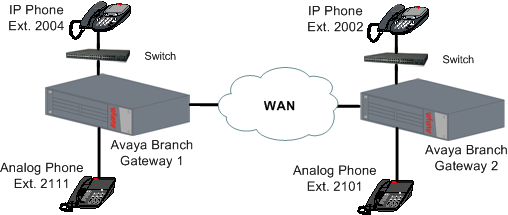
Four telephones in a sample network
The following figure shows the locations of four telephone extensions in an example network. Telephones with extensions 2004 and 2111 are connected to the local Branch Gateway 1. Extensions 2002 and 2101 are connected to the remote Branch Gateway 2.
At the site of local Branch Gateway 1 – the administrator enabled and configured the RTP-MIB application as follows:
//to enable the RTP statistics application:
 Gxxx-001(super)# rtp-stat-service
 //to view the configuration of the application:
 Gxxx-001(super)# show rtp-stat config
 RTP Statistic: Enabled
 QoS Trap: Disabled
 QoS Fault Trap: Disabled
     Fault: 0
     Clear: 0
 QoS Trap Rate Limiter:
     Token Interval: 10.00 seconds
     Bucket Size: 5
 Session Table:
     Size: 128
     Reserved: 64
 Min Stat Win: 1
 //to view the thresholds:
 Gxxx-001(super)# show rtp-stat thresholds
 Item                          Threshold              Event Threshold
 --------------------         -------------          -----------------
 Codec Loss                       0.0%                     1
 Average Codec Loss               1.0%                     N/A
 Codec RTT                        5 mS                     1
 Echo Return Loss                 1 dB                     1
 Loss                             1.0%                     1
 Average Loss                     1.0%                     N/A
 Remote Loss                      1.0%                     1
 Average Remote Loss              1.0%                     N/A
 RTT                              13mS                     1
 Local Jitter                     1mS                      1
 Remote Jitter                    1mS                      1
 SSRC Changes                     N/A                      1
 //to change the thresholds appropriately for the network:
 Gxxx-001(super)# rtp-stat thresholds codec-loss 6.0
 Gxxx-001(super)# rtp-stat thresholds average-codec-loss 0.0
 Gxxx-001(super)# rtp-stat thresholds codec-rtt 700
 Gxxx-001(super)# rtp-stat thresholds echo-return-loss 5
 Gxxx-001(super)# rtp-stat thresholds loss 6.0
 Gxxx-001(super)# rtp-stat thresholds remote-loss 6.0
 Gxxx-001(super)# rtp-stat thresholds average-loss 0.0
 Gxxx-001(super)# rtp-stat thresholds average-remote-loss 0.0
 Gxxx-001(super)# rtp-stat thresholds jitter 70
 Gxxx-001(super)# rtp-stat thresholds remote-jitter 70
 Gxxx-001(super)# rtp-stat thresholds rtt 500
 Gxxx-001(super)# rtp-stat event-threshold echo-return-loss 0
 Gxxx-001(super)# rtp-stat event-threshold loss 1
 Gxxx-001(super)# rtp-stat event-threshold remote-loss 0
 Gxxx-001(super)# rtp-stat event-threshold jitter 0
 Gxxx-001(super)# rtp-stat event-threshold remote-jitter 0
 Gxxx-001(super)# rtp-stat event-threshold rtt 0
 Gxxx-001(super)# rtp-stat event-threshold ssrc-change 0
 //to review the threshold configuration again:
 Gxxx-001(super)# show rtp-stat thresholds
 Item                          Threshold              Event Threshold
 --------------------         -------------          -----------------
 Codec Loss                       6.0%                     1
 Average Codec Loss               0.0%                     N/A
 Codec RTT                        700mS                    1
 Echo Return Loss                 5dB                      0
 Loss                             6.0%                     0
 Average Loss                     0.0%                     N/A
 Remote Loss                      6.0%                     0
 Average Remote Loss              0.0%                     N/A
 RTT                              500mS                    0
 Local Jitter                     70mS                     0
 Remote Jitter                    70mS                     0
 SSRC Changes                     N/A                      0
 //to configure the minimum statistics window for evaluating packet loss:
 Gxxx-001(super)# rtp-stat min-stat-win 50
 //to configure an external trap manager as a trap destination in addition to the active MGC:
 Gxxx-001(super)# snmp-server host 136.9.71.47 traps v1 public
 //to check SNMP configuration
 Gxxx-001(super)# show snmp
 Authentication trap enabled
 Community-Access Community-String
 ---------------- ----------------
 read-only *****
 read-write *****
 SNMPv3 Notifications Status
 -----------------------------
 Traps: Enabled
 Informs: Enabled Retries: 3 Timeout: 3 seconds
 SNMP-Rec-Address Model Level Notification Trap/Inform User name
 ---------------- ----- ------- --------------- ----------- -------------------
 135.9.77.47 v1 noauth all trap ReadCommN UDP port: 162 DM
 136.9.71.47 v1 noauth all trap WriteCommN
 UDP port: 162
 //to enable the sending of QoS traps:
 Gxxx-001(super)# rtp-stat qos-trap
 //to enable and configure the sending of fault and clear traps:
 Gxxx-001(super)# rtp-stat fault 2 0
 //to view RTP statistics configuration again:
 Gxxx-001(super)# show rtp-stat config
 RTP Statistic: Enabled
 QoS Trap: Enabled
 QoS Fault Trap: Enabled
     Fault: 2
     Clear: 0
 QoS Trap Rate Limiter:
     Token Interval: 10.00 seconds
     Bucket Size: 5
 Session Table:
     Size: 128
     Reserved: 64
 Min Stat Win: 50