AVAYA DOCUMENTATION CENTER
Find answers to your technical questions and learn how to use our products
Deploying Avaya IP Office™ Platform SSL VPN Services
System architecture
The SSL VPN service provides secure tunneling between the IP Office hardware installed at a customer site and an Avaya VPN Gateway (AVG) installed at a service provider site. Use the information in this section to understand the network architecture used by the SSL VPN service.
Network interface cards
Avaya recommends that you deploy the AVG server in a two armed configuration with two network interface cards (NICs). One interface handles private traffic between the SSL VPN and the trusted intranet. This connection allows the SSL VPN service to access internal resources and allows you to configure and manage the IP Office system from a management station. The second interface handles traffic to and from the internet.
Routing
At the service provider site, you can configure corporate routing between the AVG and its private network. At the customer site, you can locate each IP Office system on the private side of a corporate router. The corporate router does not require configuration changes for the SSL VPN service to work.
IP Office forwards data to the AVG over the SSL VPN service using split tunneling routes or static routes. You must use one of these options to send traffic through the SSL VPN tunnel:
let IP Office dynamically install split tunneling routes when the SSL VPN service connects with AVG, and remove these routes when the service disconnects
configure a static route in IP Office Manager
Split tunneling
When you install and configure AVG, you can add split network subnets or host addresses for a group. The IP Office system learns the routing information for the tunnel dynamically when the SSL VPN service successfully connects with the AVG. The split networks routes are removed when the SSL VPN service disconnects from AVG.
For information about configuring split tunneling on the AVG using Net Direct, see the Avaya VPN Gateway Administration Guide (NN46120-105) and the Avaya VPN Gateway BBI Application Guide (NN46120-102). For information about configuring split tunneling using the command line interface, see CLI Application Guide (NN46120-101).
Static routes
As an alternative to split tunneling, you can configure a static route directly on the IP Office system. When you configure a static route, the system uses the IP route information configured in Manager to determine the destination for forwarded traffic. You must define the SSL VPN service as the destination.
Use a static route when:
split tunneling routes are not advertised by the AVG and you need to send traffic through the tunnel
the SSL VPN service is not connected to the AVG and you want to queue traffic to be forwarded through the tunnel when the connection is restored; in this case, IP Office temporarily queues a small number of packets that trigger the connection when the SSL VPN is in-service but disconnected
You can configure multiple static routes on the IP Office system.
Authentication
Each IP Office system can support multiple SSL VPN tunnels. Each instance of an SSL VPN service is assigned a unique private static IP address. When you connect the SSL VPN service, the AVG authenticates the IP Office system. For a small number of IP Office systems, you can use the Avaya VPN Gateway (AVG) local database to create user data needed for authentication. For larger deployments, it is recommended that you use a RADIUS server for authentication.
Service agent access
Service agents located at the service provider site can connect to any IP Office system that has an in-service SSL VPN connection to AVG. They can monitor and manage the IP Office system remotely by contacting the IP address of the SSL VPN tunnel, and can access the IP addresses of multiple SSL VPN services concurrently.
The AVG ensures SSL VPN tunnels cannot communicate with one another. You do not need to configure additional settings to ensure that tunnels remain secure and independent.
Fault management
A fault management server is an optional component in the SSL VPN service. Deploy a fault management server at the service provider site and use the SSL VPN service to send system faults to that server. You can set event filters to determine which faults are reported. For example, you can set filters to report any events related to the operation of the IP Office system, and you can also report faults that are specific to the operation of the SSL VPN service.
Avaya recommends that you set the SSL VPN service Account Name to match the SNMP Agent Device ID name. The SNMP Agent Device ID is configured in IP Office Manager on the System form, under System Events, Configuration.
Firewall traversal
The SSL VPN service works transparently through the firewall. You do not need to configure your corporate router to allow the SSL VPN service if you have already configured it for HTTPS traffic. The SSL VPN service uses the same destination port for its TCP traffic.
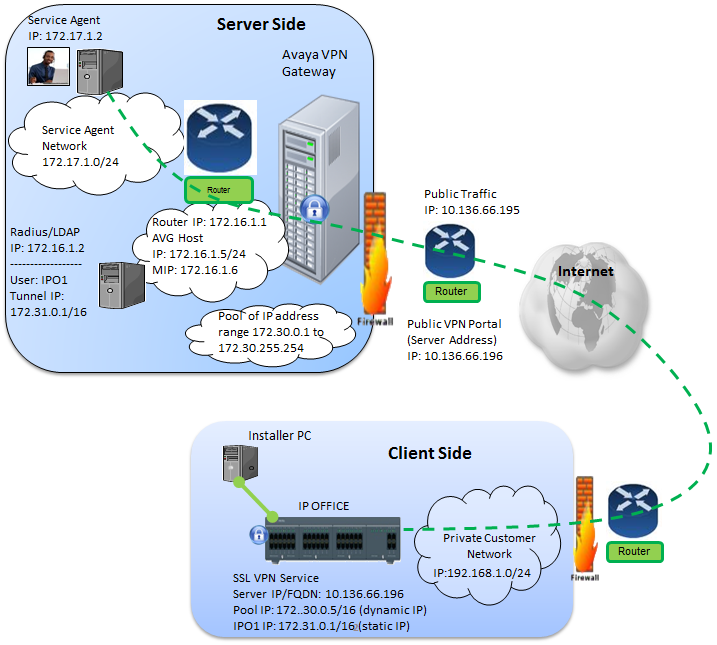
Architecture example
The following diagram shows an example of the architecture used by the SSL VPN service.