

AVAYA DOCUMENTATION CENTER
Find answers to your technical questions and learn how to use our products
Deploying Avaya IP Office™ Platform SSL VPN Services
RADIUS server configuration attributes
The SSL VPN service requires a RADIUS server. Avaya recommends that you use the Avaya Identity Engines Ignition Server as the RADIUS server.
When you connect the SSL VPN service, the Avaya VPN Gateway (AVG) authenticates the IP Office system by sending a query to an external RADIUS server. This section lists the attributes that you must configure on the RADIUS server.
RADIUS server attribute mapping
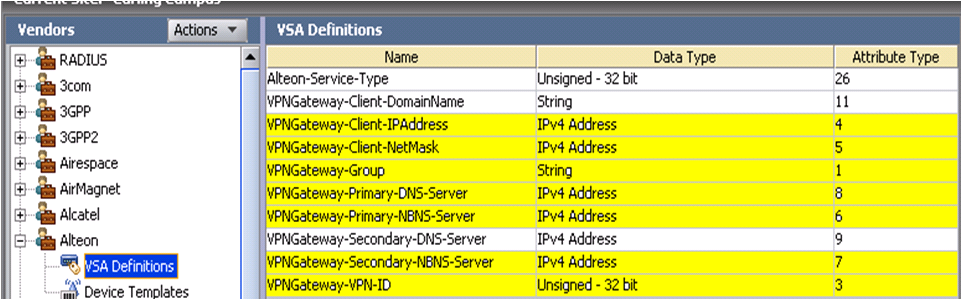
Vendor specific Radius attribute names and associated data types and vendor type codes for Alteon vendor (AVG) are contained in the list below.
The following examples have been obtained using an Avaya Identity Engines RADIUS server. The highlighted attributes have been configured as Network Attributes and Settings in the AVG RADIUS server configuration.
• Inbound Attributes coming from the AVG to the Radius Server during the authentication request are shown below.
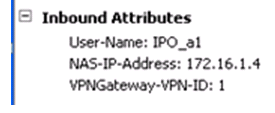
The Radius attributes sent by AVG are:
o NAS-IP-Address (generic radius attribute) is the AVG IP address.
User-Name (generic radius attribute) is the user account name
VPNGateway-VPN-ID is an Alteon attribute
The IDEngine Radius server has a default internal attribute mapping for the most popular Radius attributes as seen in the table below. The highlighted rows correspond to the Radius attributes contained in the Radius REQUEST above.
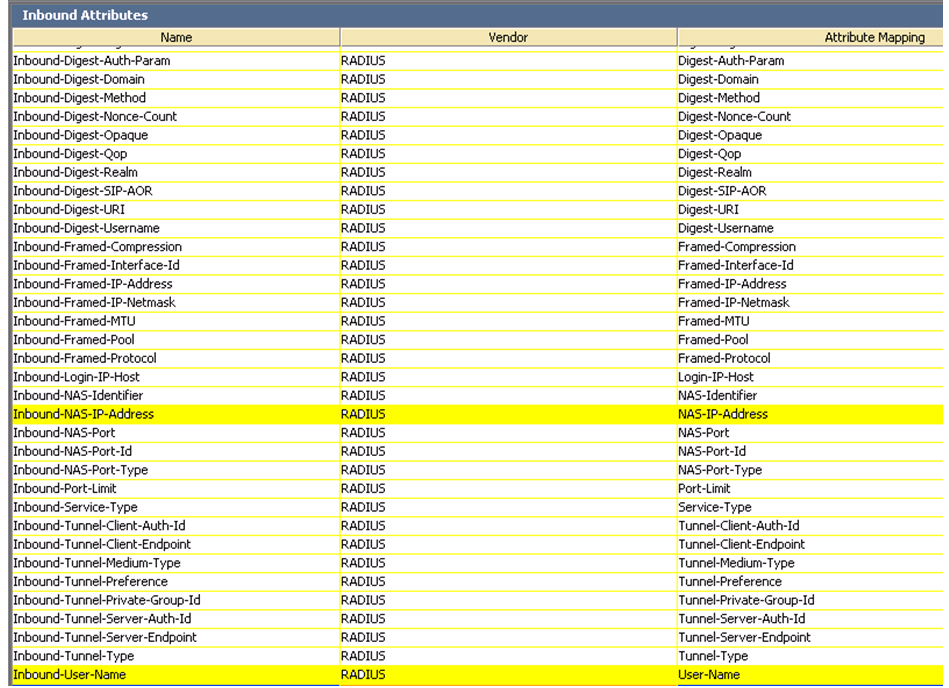
Radius servers evaluate the inbound attributes using authorization rules. The rule can use an inbound attribute to check a condition or can return the inbound attribute in a Radius RESPONSE as an outbound value. If an inbound attribute sent by AVG requires evaluation but is not part of the default Radius Server set it must be defined as a new inbound attribute on the Radius server. For examples of authentication rules, see IDEngine Administration.
• Outbound Attributes sent to the AVG from the Radius Server during an authentication RESPONSE are shown below:
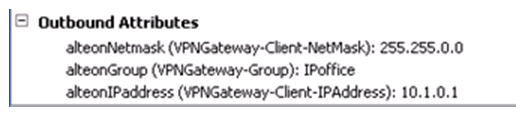
Outbound attributes are the data fields the radius server uses to carry provisioning data to the VPN Gateway. The outbound attributes are generic or vendor type radius protocol attributes. Similar with the inbound attributes the outbound attributes need to be created if they are not part of the default set of the Radius server. In the example above the three Alteon outbound attributes (specific for AVG): “alteonGroup”, “alteonIPaddress” and “alteonNetmask” need to be created in the Radius server as in the example below:

The outbound attribute values can be set to static values or can be mapped to user attributes in the local radius server database or in an LDAP repository. An example of an outbound attribute value mapped to a database user attribute is shown below:
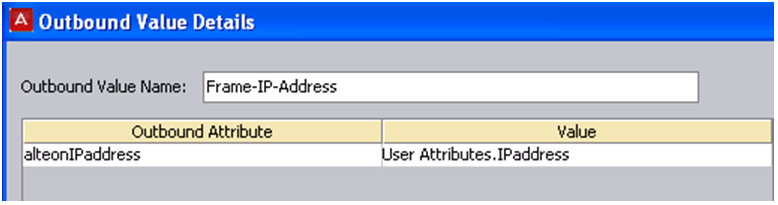
Outbound values are associated with authentication rules and are sent to the VPN Gateway as radius attributes when the rule is evaluated. If the rule evaluates to “Allow” the outbound values are used to set characteristics of the user’s session. When the rule is evaluated to “Deny” the returned outbound values are typically used to convey information on the cause of the denial. For more information, see the IDEngine documentation.