

DOCSHUB DOCSHUB
  • Library
  • Avaya Support Site Avaya Learning Blogs Videos & Podcasts Knowledge base Report Product bugs
Deutsch English Español (México) Français Français (Canada) Italiano Magyar Nederlands Português (Brasil) Русский עברית العربية 中文(简体) 中文(繁體) 日本語 한국어
Login
DOCSHUB DOCSHUB
  • Library
  • Avaya Support Site Avaya Learning Blogs Videos & Podcasts Knowledge base Report Product bugs
  • Deutsch English Español (México) Français Français (Canada) Italiano Magyar Nederlands Português (Brasil) Русский עברית العربية 中文(简体) 中文(繁體) 日本語 한국어
Login

Deploying Avaya IP Office™ Platform SSL VPN Services

Table of Contents

Type to filter navigation items by title
  • Legal
  • Document changes since last issue
  • About the SSL VPN service
    • Deployment options
    • Operating modes
    • System architecture
    • System requirements and limitations
    • Related documentation
  • Workflow for configuring an SSL VPN
  • Configuring the Avaya VPN Gateway
    • Initial planning and setup
    • Avaya VPN Gateway Configuration Task Flow
    • Basic AVG configuration
    • Enabling remote access services
    • Running the Net Direct Wizard
    • Modifying the default AVG for SSL VPN
    • Configuring local authentication
    • Configuring RADIUS authentication
    • RADIUS server configuration attributes
  • Configuring an SSL VPN for Avaya support
    • Configuring an SSL VPN using an on-boarding file
    • Using the on-boarding file to modify an existing service
  • Configuring an SSL VPN for Avaya partner support
    • Configuring the SSL VPN service
    • Installing a certificate
    • Configuring short codes
      • Configuring a short code to enable the SSL VPN service
      • Configuring a short code to disable the SSL VPN service
      • Configuring an auto attendant
    • Configuring alarm notifications
      • Configuring SNMP trap destinations
      • Configuring email alarm notifications
      • Configuring syslog entries
    • Configuring a static route
  • Configuring an Avaya Partner SSL VPN using an SDK
    • Downloading the SDK
    • Downloading the IP Office Inventory File
    • Using the On-boarding SDK
      • Store the SSL VPN credentials in the AVG database
      • Running the On-boarding SDK
      • Uploading the On-boarding file and verifying the SSL VPN
    • Using the On-boarding Express SDK
      • Running the On-boarding Express SDK
      • Process On-boarding Express SDK zip Files
  • Network address and port translation (NAPT) rules
    • Configuring NAPT rules
    • Deleting an NAPT rule
  • Verify the connection between IP Office and AVG
    • Verifying the connection using SysMonitor
    • Verifying the AVG SSL VPN deployment using System Status Application
    • Verifying the connection using the AVG BBI
    • Sending a test alarm
  • Monitoring and managing the IP Office system
    • Monitoring IP Office remotely using SSA
    • Monitoring IP Office remotely using SysMonitor
    • Remotely monitoring LAN devices using the SSL VPN tunnel
    • Configuring IP Office remotely using Web Manager
    • Configuring IP Office remotely using Manager
    • Configuring Server Edition systems remotely using IP Office Manager for Server Edition
    • Configuring Server Edition systems remotely using Web Control
  • Upgrading IP Office remotely
  • Monitoring the SSL VPN service
    • Viewing the tunnel status
      • Tunnel status field descriptions: summary table
      • Tunnel status field descriptions: detail table
    • Monitoring alarms using SSA
      • SSA alarm descriptions
    • Troubleshooting the SSL VPN service
      • SysMonitor output descriptions
  • Maintaining the SSL VPN service
    • Enabling and disabling the service
      • Enabling the service using Manager
      • Disabling the service using Manager
      • Enabling the service using SSA
      • Disabling the service using SSA
      • Enabling the service using a short code
      • Disabling the service using a short code
      • Enabling and disabling the service using set-based administration
      • Enabling and disabling the service using programmable keys
    • Resetting the password
      • Resetting the password using an on-boarding file
      • Resetting the password using Manager
  • Appendix A: AVG Quick Setup Wizard Example
  • Appendix B: Modifying the default AVG for SSL VPN (with screens)
  • Appendix C: Configuring RADIUS authentication (with screens)
  • Appendix D: AVG configuration settings
Home
Deploying Avaya IP Office™ Platform SSL VPN Services
Configuring the Avaya VPN Gateway
Avaya VPN Gateway Configuration Task Flow

Avaya VPN Gateway Configuration Task Flow

Share this page

  • On LinkedIn
  • On X
  • On Email

PDF Export Options

  • This Topic
  • Entire Document
Last Updated : Nov 11, 2014 |
Avaya IP Office
Maintaining
Administrator
12.0
Expert

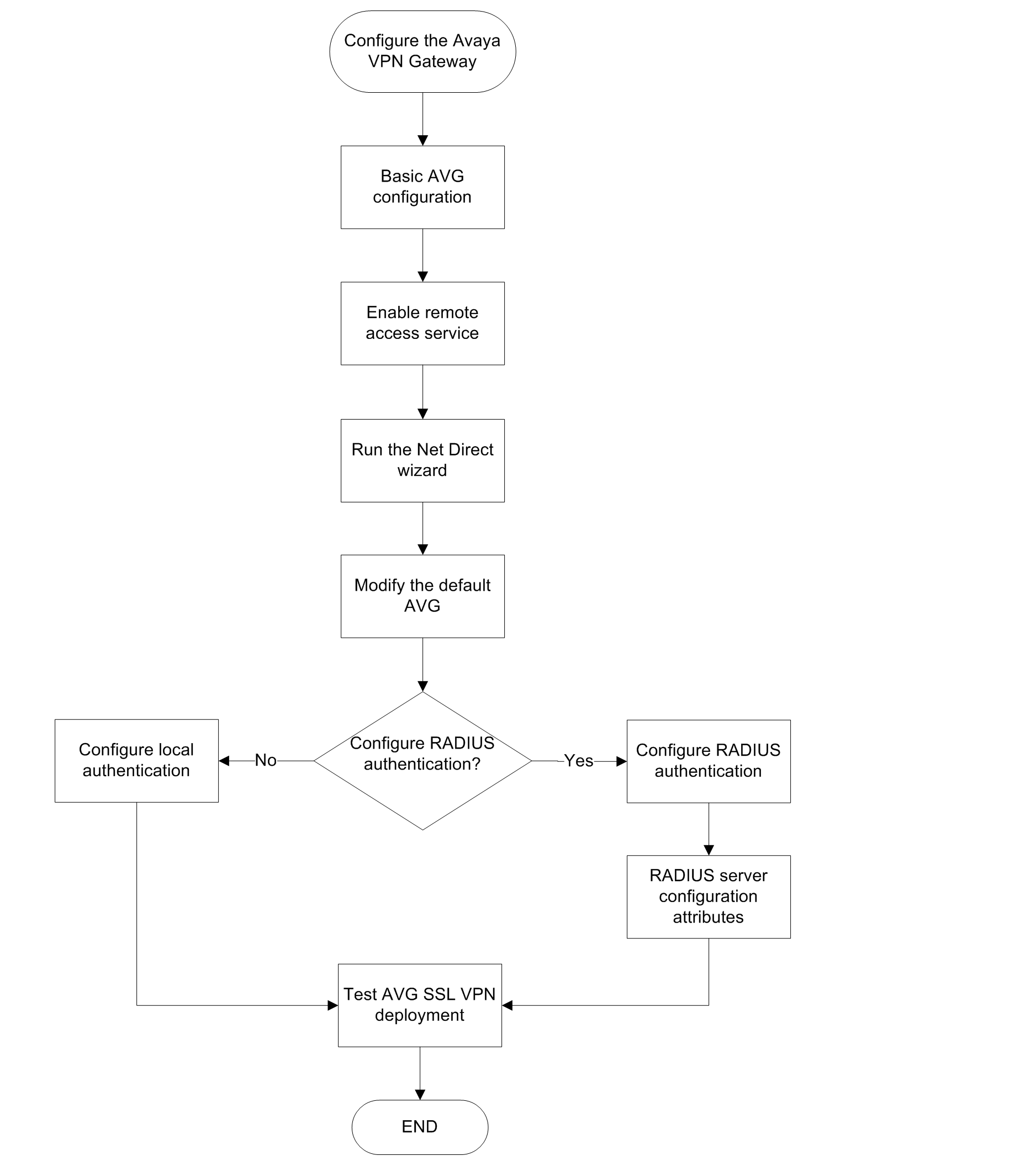
This task flow shows you the sequence of procedures you perform to configure the AVG.
Navigation

  • Basic AVG configuration

  • Enabling remote access services

  • Running the Net Direct Wizard

  • Modifying the default AVG for SSL VPN

  • Appendix B Modifying the default AVG for SSL VPN (with screens)

  • Configuring RADIUS authentication

  • RADIUS server configuration attributes

Related information
Configuring the Avaya VPN Gateway
Send Feedback

Topic navigation

Previous Topic

Initial planning and setup

Next Topic

Basic AVG configuration

In this article

  • Navigation

STAY CONNECTED

Twitter Youtube Linkedin
Footer Icon
  • Sitemap
  • Terms of use
  • Privacy
  • Cookie Policy
  • Trademarks
  • Accessibility
© 2026 Avaya LLC