

AVAYA DOCUMENTATION CENTER
Find answers to your technical questions and learn how to use our products
Implementing Avaya Proactive Outreach Manager
Architecture
The diagram below lists the key components that are part of the Active Data Center in the solution. The Standby Data Center needs to be deployed as a separate entity with an identical architecture.
Microsoft SQL Server for POM database: You can enable Geo-Redundancy only when POM is installed in the CCElite mode.
POM supports Oracle, Postgres, and MSSQL databases, but geo-redundancy is supported only with the MSSQL database.
Experience Portal synchronization is required as POM is deployed on the Experience Portal platform. Organizations, zones, and users created on Experience Portal are stored in the local database of Experience Portal. There is no High Availability (HA) solution available to synchronize multiple Experience Portal servers deployed on multiple data centers. Therefore, you must manually create Experience Portal data on all data centers.
In dual data center configuration, Communication Manager must be deployed along with Survival Core Server (ESS). Application Enablement Services is configured in the Geo-Redundancy HA mode. Avaya Call Management System is deployed in the HA mode.
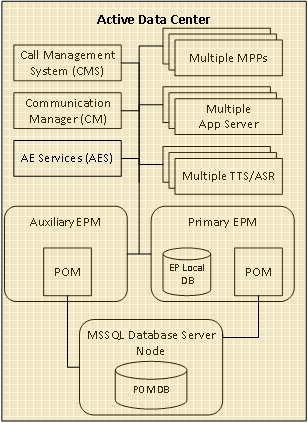
Avaya Aura as communication infrastructure including Communication Manager, Session Manager and the Application Enablement Server.
Communication Manager must be deployed along with Survival Core Server in the standby site (fka. Enterprise Survivable Server - ESS). Application Enablement Services is configured in the Geo-Redundancy HA mode.
Avaya Call Management System as the Reporting solution. CMS needs to be deployed in the Geo-Redundant HA (GRHA) mode.
Avaya Experience Portal including the Experience Portal Manager (EPM) (multiple EPMs in case of local redundancy), multiple Media Processing Platform (MPP), application and speech servers – as the platform POM is deployed on.
Note that the Experience Portal in the standby data center is a separate system, and not an auxiliary.
Experience Portal must be administered identically in all sites when related to geo-redundancy. This includes organizations, zones, and users created on Experience Portal and are stored in the local database of Experience Portal. There is no High Availability (HA) solution available to synchronize multiple Experience Portal servers deployed on multiple data centers. Therefore, you must manually create and administer Experience Portal identically on all data centers.
POM software running on the EPMs and the POM database.
You can enable Geo-Redundancy only when POM is installed in the CCElite mode with Microsoft SQL Server (MSSQL) as the database. POM utilizes the MS-SQL AlwaysOn feature as the foundation for Geo-Redundancy. Geo-Redundancy is not supported when an Oracle or PostgreSQL database is used with POM.
A sample setup of the database is shown in the following diagram.
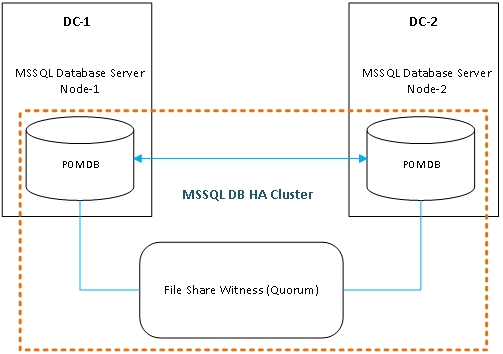
POM depends on a database for all the activities, hence, having an important role for setting up Geo-Redundancy. For Geo-Redundancy, the database must be highly available at both data centers. You must ensure databases at both the data centers are synchronized. MSSQL AlwaysOn is a High Availability (HA) feature of the database that is utilized to implement POM Geo-Redundancy.
To install and configure MSSQL AlwaysOn, see the Microsoft documentation. It is the responsibility of the customer to set up and configure Windows Server Failover Cluster (WSFC) and the MSSQL AlwaysOn feature.
Customers must ensure that the primary instance of the MSSQL database is always on the active data center. This ensures that the database is always in close proximity to the POM server and there are no network latencies between POM server and the database. A File Share Witness is a file share available to all nodes in a High Availability (HA) cluster.