AVAYA DOCUMENTATION CENTER
Find answers to your technical questions and learn how to use our products
Implementing Avaya Proactive Outreach Manager
Overview
You must use the POM Trusted Certificate Management web user interface page for the certificate management to ensure the secure communication between the internal and external components of POM. Trust Management provides an identity to establish authenticated TLS sessions.
Using the POM Trusted Certificate Management page, you can do the following:
View installed Trusted Certificates on the POM server.
Add or remove Trusted Certificates on the POM server.
Fetch https certificate for POM integrated components.
Import a certificate for POM integrated components.
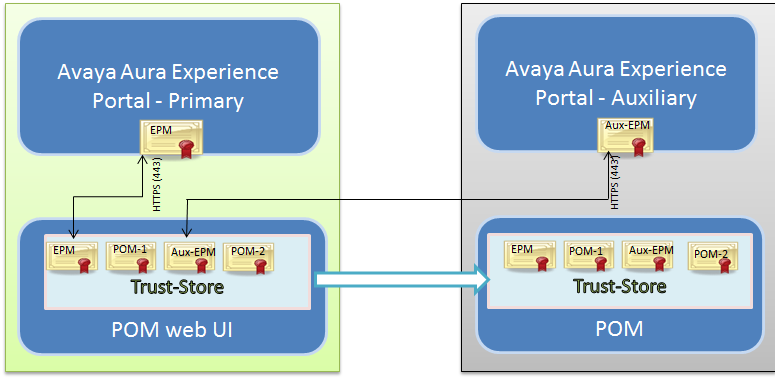
POM maintains all the configured certificates in pomTruststore file located at the $POM_HOME/config folder on the primary EPM server. In case of a multi-server installation, the system pushes all configured certificates to the POM servers. POM supports .cer, .pem, and der formats of the certificate.
POM creates and manages the TrustStore.xml file. POM creates this file when a user adds or deletes a certificate in the POM truststore using the POM User interface. POM copies this file on all the POM servers in a multi-POM setup. Do not edit this file manually to avoid connectivity failure issues between POM server and other servers.
You can use POM to configure the validity of an identity certificate of an Avaya product. You can set the certificate validity to maximum 1186 days.
Avaya products using digital certificates and supporting the generation of alarms require an administrator to generate an alarm notification. An administrator can configure the system to generate an alarm sixty days before a digital certificate expires. By default, the system generates alarm notifications daily until the administrator stops them.
Note:
To sync with the primary epm truststore file, ensure that all the auxiliary server EPM service is up and running.
Warning:
You must restart the POM server after any modification.
POM integrates with Avaya Oceana®, Context Store, AES, and AACC. You must import or fetch respective certificates on the POM Trusted Certificate page. To add the POM server installed on the auxiliary EPM server, you must first fetch the auxiliary server’s EPM certificate on the POM Trusted Certificate and then add the POM server.
Note:
In FIPS mode it is mandatory to import AACC certificate in POM trust store.
The following diagram shows the multi POM setup containing primary Avaya Experience Portal and POM. The system fetches the EPM certificate on the POM Trusted Certificate page.