

AVAYA DOCUMENTATION CENTER
Find answers to your technical questions and learn how to use our products
Avaya CMS Supervisor Report Designer
Edit
The following is a description of the Edit menu.
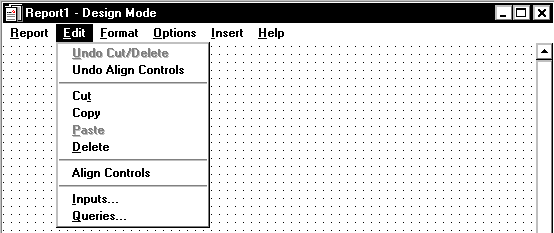
Name |
Description |
|---|---|
Undo Cut/Delete |
Undo a cut or deletion. |
Undo Align Controls |
Undo an alignment you made. |
Cut |
Remove an item from the report and place it on the Windows clipboard. |
Copy |
Copy the items that you have selected on the report and place it on the Windows clipboard. You can copy only entire tables and entire charts, not a portion of a table or chart. If you want to rearrange the order of the columns on a grid, use the Format Table window. You can copy from one report to another report. To do so, complete these steps:
|
Paste |
Place one or more items currently on the Windows clipboard into the report that is currently selected in Design Mode. |
Delete |
Remove the currently-selected items from the report. |
Align Controls |
Align multiple fields according to the controls in the Align Controls dialog box. This option is enabled only when multiple fields are selected. |
Inputs |
Start the Select Inputs assistant, which enables you to choose the items that will be included on the report input window for this report. For instructions on how to use the Select Inputs assistant, see The Edit | Inputs menu option. |
Queries |
Start the Create a Query assistant, which is where you define the SQL queries that will be used to retrieve the data to be displayed on the report. For instructions on how to use the Create a Query assistant, see The Edit | Queries menu option. |