

AVAYA DOCUMENTATION CENTER
Find answers to your technical questions and learn how to use our products
Avaya CMS Supervisor Report Designer
Axis tab
Use the Axis tab to specify the title that will be displayed on each axis of the chart report.
Example
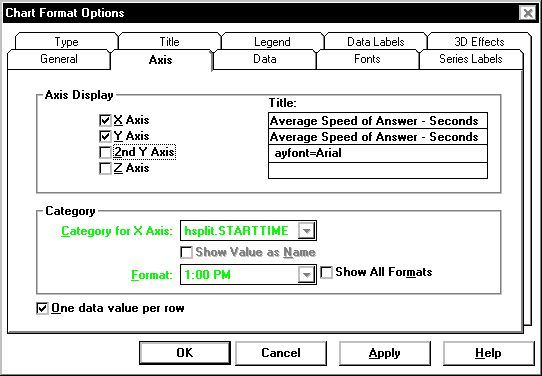
Axis tab options
You can change the following chart parameters:
Axis Display
Makes each of the axes visible or invisible. The choices are X Axis, Y Axis, 2nd Y Axis, and Z Axis.
Name |
Description |
|---|---|
2nd Y Axis |
Available only for bar charts. Select this check box to display the y-axis information on the right side of the bar chart. This is in contrast to the standard y-axis that displays on the left side of the chart. |
Z Axis |
Available only for 3D bar charts. Select this check box to make the chart look 3-dimensional. |