

AVAYA DOCUMENTATION CENTER
Find answers to your technical questions and learn how to use our products
Avaya CMS Supervisor Report Designer
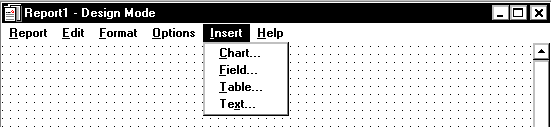
Insert
The following is a description of the Insert menu.
Name |
Description |
|---|---|
Chart |
Opens the Chart Assistant, which is where you define the contents of a chart. A chart is a graphical presentation of the report information. This menu item is unavailable if no queries have been defined. For more information about the Chart Assistant, see The Insert | Chart menu option. |
Field |
Opens the Field Assistant, which is where you define the contents of a field to be placed on the report. For more information with the Field Assistant, see The Insert | Fieldmenu option. |
Table |
Opens the Table Assistant, which is where you define the contents of a table to be placed on the report. A table is a standard Avaya Call Management System (CMS) report presentation format. This menu item is unavailable if no queries have been defined. For more information with the Table Assistant, see The Insert | Table menu option. |
Text |
Opens the Text Assistant, which is where you can enter plain text that will appear on the report. For more information with the Text Assistant, see The Insert | Text menu option. |