

AVAYA DOCUMENTATION CENTER
Find answers to your technical questions and learn how to use our products
Avaya CMS Supervisor Report Designer
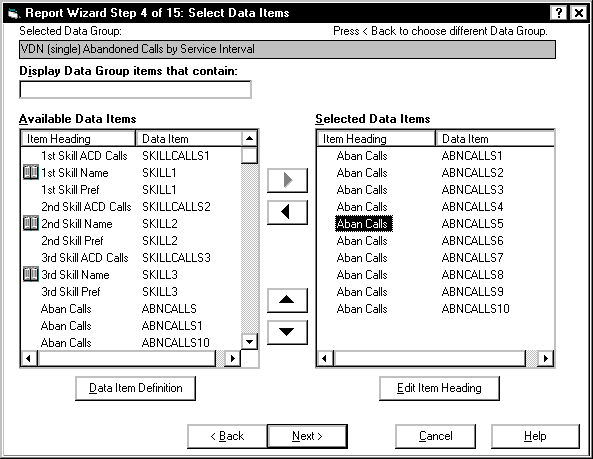
The Select Data Items page
Use the Select Data Items page to select the specific types of data from the CMS databases that you want displayed in your report.
For information on how to do all the available tasks on this page, see Procedures for the Select Data Items page.
Example
Box and button descriptions
The following table describes the box and buttons on the Select Data Items page.
Name |
Description |
|---|---|
Display Data Group items that contain |
Use this field to display only specific items in both columns of the Available Data Items box. For more information, see Filtering data group items. |
Available Data Items |
Contains all the data items associated with the data group. This list allows you to add data items to the Selected Data Items box. |
Data Item Definition |
If you highlight a data item in the Available Data Items box and select this button, Report Wizard displays a topic in Help that defines the data item. |
Selected Data Items |
Contains the predefined database items and calculations from the Available Data Items box that you want in your report. |
Edit Item Heading |
If you highlight an item heading in the Selected Data Items box, and select this button, you can change the item heading. |
Data item column descriptions
The following table describes the data item column on the Select Data Items page.
Name |
Description |
|---|---|
Item Heading |
Lists the default heading for the database item or calculation. The item heading is the heading used in standard CMS reports. |
Data Item |
Lists the database item or calculation (internal name). |
The system displays icons if the data type is alphanumeric or has a graphical representation. Synonyms that are defined for data items are in parenthesis.