

AVAYA DOCUMENTATION CENTER
Find answers to your technical questions and learn how to use our products
Avaya CMS Supervisor Report Designer
The Text Format Options window
To open the Text Format Options window, select a text item on the report and then select Text from the Format menu. The Text Format Options window allows you to change the font display characteristics for the selected text.
Example
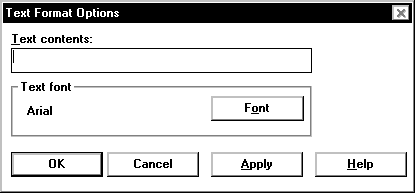
Text Format Options parameters
You can specify the following parameters.
Name |
Description |
|---|---|
Text contents |
Enter the word or phrase that you want to insert on the report in this text box. |
Text font |
Opens the Font window, which allows you to change the Font, Font Style, Size, Effects, Color, or Script box. |