

AVAYA DOCUMENTATION CENTER
Find answers to your technical questions and learn how to use our products
Deploying Avaya Wireless DECT with IP Office
Front Panel
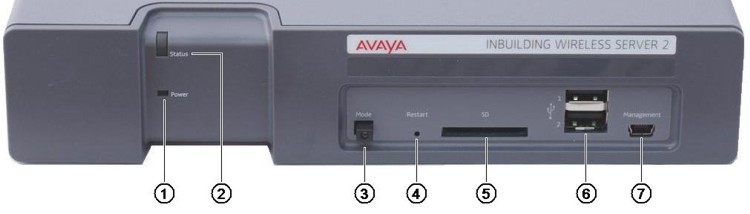
Power LED
Indicates the status of the power supply to the unit. See Status LED.
Status LED
Indicates the status of the unit.
Mode Switch and LED
Pressing this switch twice will put the unit into mass storage mode. The unit will automatically return to normal operation after 10 minutes. While in mass storage mode, the LED in the switch flashes. Mass storage mode is used to allow a Windows PC to download the suitable drivers for USB cable connection to the Management port.
Restart Switch
SD Card Slot
Not used for IP Office operation.
USB Ports
Not used for IP Office operation.
Management Port
This port can be used for a USB connection to a PC in order to do unit configuration. Installation of the drivers for this requires the unit to be put into mass storage mode using the Mode Switch (see above). The address used for this port is 192.5.36.229.