SoftConsole is the PC-based Windows receptionist application for IP Office. It can be purchased with the Receptionist user license.
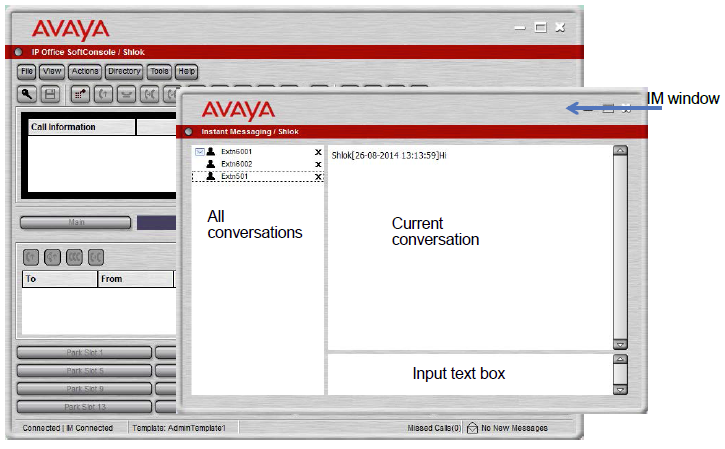
SoftConsole provides enterprise receptionists and operators with call information and call actions to simplify call handling and instant messaging. With SoftConsole, users see the status of other users and adjust basic telephony settings of other users, such as forwarding numbers. Avaya recommends using phones that support Auto Answer. Users can use instant messaging features provided by Avaya one-X® Portal, if available.
Figure : 1. SoftConsole instant messaging window
WebSocket communication allows SoftConsole clients to communicate with IP Office and Avaya one-X® Portal. The WebSocket protocol is bidirectional between the client and the server. As the communication is done over port 80 or 443 (same port used for HTTP), there are no issues with firewall traversal. In a hosted environment, WebSocket communication provides security.
SoftConsole can be minimized in the Windows system tray when not in use, but will pop up on the screen when a call is received. Sound and media files can be associated with calls. If this feature is used, the PC requires a sound card and speakers.
SoftConsole supports the following features:
Answering calls
Making outgoing calls
Supervised and unsupervised transfers
Transfer calls to voicemail
Hold and park calls
Monitoring queues and answering queue calls
Using and viewing conference rooms
Conferencing held calls
Adding users to a conference
Adding text to a call
Door release
Intrude
Sending text messages
Paging
Recording calls
Sending email
Using dial pad
Multiple language support, users can select language