

AVAYA DOCUMENTATION CENTER
Find answers to your technical questions and learn how to use our products
Configuring Workflows for Avaya Experience Platform Public Cloud
Designer interface description
Orchestration includes two primary interfaces: the Designer interface and the Orchestration Manager interface. Use the Designer interface to create and edit the workflow. This section mainly describes the Designer interface.
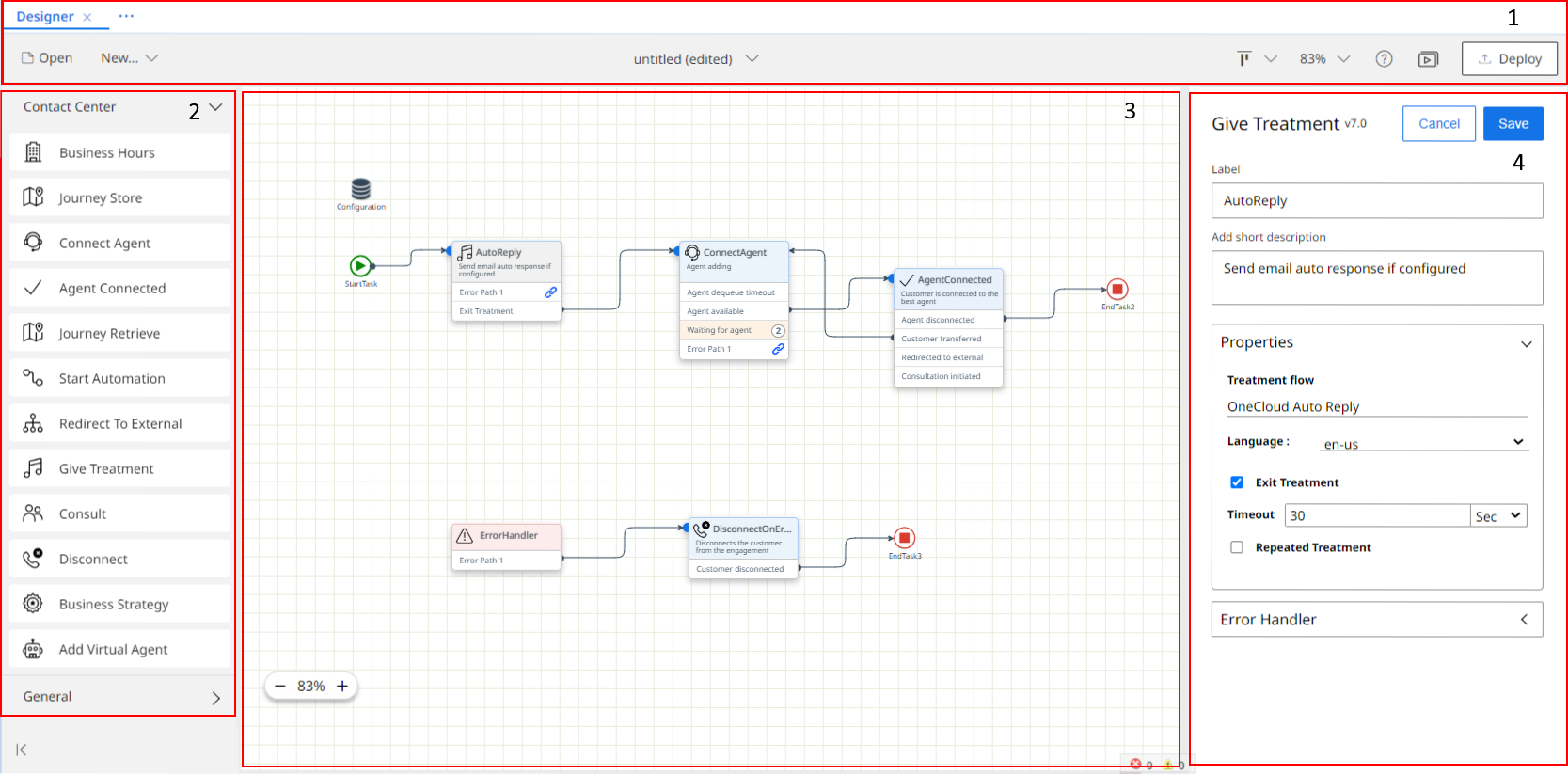
The Designer interface has the following four sections:
-
Menu bar
-
Palette
-
Canvas
-
Properties pane
Menu bar
Buttons and icons display in a menu bar along the top of the interface. Place your cursor over any button or icon to see a brief description of its purpose.
|
Button/Icon
|
Description
|
|---|---|
|
Open
|
Click to open an existing draft or deployed workflow.
|
|
New...
|
Click to create a new workflow, create a workflow from a template, or import an existing workflow.
|
|
<workflow_name>
|
Click the name of the workflow to choose from options such as saving and exporting.
|
 |
Task alignment options – select a group of nodes on the canvas. Click this icon to change the alignment of the selected nodes.
|
 |
Zoom – use this to zoom in and out or show and hide the layout grid on the canvas.
|
 |
Click to contact Avaya Support, access the link to the Documentation Center, or to learn the version of Orchestration.
|
|
Preview
|
Click to display a preview of the workflow in a separate window. From this window, you can select to print the workflow without the user interface surround.
|
|
Deploy
|
Click to deploy the workflow from the Designer interface.
|
Palette
The palette lists the tasks that you can drag and drop onto the canvas as part of a workflow. Tasks with common functions, such as contact center or general tasks, are divided into separate drawers that can be collapsed or expanded. The palette is collapsible.
Canvas
The canvas is the section of the interface where the workflow displays as you build it. Drag tasks from the palette onto the canvas to create the workflow. When dragging tasks across the canvas, guidelines appear to aid alignment. When you drag a node onto the canvas, it automatically snaps to the closest grid location.
The bottom corner of the canvas displays the validation area with the errors that you must fix to deploy the workflow.
Properties pane
Orchestration displays the properties pane next to the canvas when you double-click a task on the canvas. It displays the configurable task properties.