

AVAYA DOCUMENTATION CENTER
Find answers to your technical questions and learn how to use our products
Configuring Workflows for Avaya Experience Platform Public Cloud
Give Treatment
With the Give Treatment task, you can configure automated treatment for the following cases:
-
Queuing: If an agent is not immediately available in the Connect Agent task.While the customer is waiting for an agent, Automation provides the selected wait treatment to the customer. In this case, the Give Treatment task works in parallel with the Connect Agent task and the Business Strategy task. Orchestration automatically terminates the Give Treatment task when an agent is available.
-
Non-queuing: If you make an announcement that is not related to queuing.For example, in an error path that you configure for the Error Handler task, you can inform the customer about an error.
The Give Treatment task sends control over the interaction to Automation for automated treatment of the customer.
In the Playback mode properties, you can select one or two treatment flows that Automation uses. The playback modes are preconfigured with looping sequences for the primary and supplementary treatments. Ensure you select an appropriate playback mode for the channel. Not every playback mode is suitable for every channel. For example, if you select the Play Primary followed by Supplementary mode for Chat or Messaging channels, the customer receives messages continuously as spam.
For more information about configuring wait treatment in Automation, see Give Treatment flow.
Properties
|
Properties
|
Description
|
|---|---|
|
Playback mode
|
Select the primary and supplementary treatment looping options. You can select from the following playback modes:
|
|
Primary treatment
|
Type the name of the Automation treatment flow for the primary treatment. Use the Type to search field to find the flow.
In the Language field, select the language of the treatment flow.
|
|
Supplementary treatment
|
Type the name of the Automation treatment flow for the supplementary treatment. Use the Type to search field to find the flow.
In the Language field, select the language of the treatment flow.
|
|
Interval
|
Enter the time interval in seconds, minutes, or hours. The Interval property is available for the following playback modes:
Note:
When using the interval with the Voice channel, ensure the duration of the treatment is longer than the interval. If the treatment is shorter than the interval, the customer hears silence and could abandon the interaction.
|
Playback Modes
You can select a playback mode to suit your business requirements. The following table describes the playback modes available:
|
Playback mode
|
Graphic
|
Description
|
|---|---|---|
|
Play Primary once and exit
|
 |
Play the primary treatment once until the end, then exit the Give Treatment task.
This playback mode automatically generates the Exit Treatment output.
You can use this playback mode for every channel. Use this playback mode to set up automatic replies for email.
|
|
Play Primary in infinite loop
|
 |
Play the primary treatment and repeat. Give Treatment plays this loop until a suitable agent is available.
When you specify a time in the Interval field, Give Treatment plays the primary treatment again at each interval. Use this playback mode with the interval for Chat and Messaging channels. The customer is not overwhelmed with constant messages with the interval configuration.
Use this playback mode with the Connect Agent task.
Use this playback mode for the Voice channel.
|
|
Play Primary followed by Supplementary
|
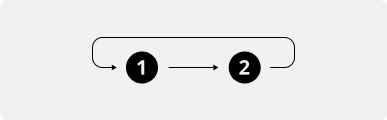 |
Play the primary treatment followed by the supplementary treatment and repeat. Give Treatment plays this sequence in a loop until a suitable agent is available.
Use this playback mode with the Connect Agent task.
Use this playback mode for the Voice channel.
|
|
Play Primary and interrupt with Supplementary
|
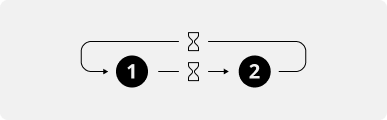 |
Play the primary treatment and interrupt with the supplementary treatment at the time interval you specify in the Interval field. Give Treatment plays this sequence in a loop until a suitable agent is available.
Use this playback mode with the Connect Agent task.
Use this playback mode for the Voice channel.
|
|
Play Primary and interrupt with Supplementary in the loop
|
 |
Play the primary treatment and interrupt with the supplementary treatment in the loop at the time interval you specify in the Interval field. The primary treatment plays once at the beginning. Then, Give Treatment plays the supplementary treatment at each time interval until a suitable agent is available.
Use this playback mode with the Connect Agent task.
Use this playback mode for Chat and Messaging channels.
|
Email channel
The Email channel is compatible only with the Play Primary once and exit playback mode.
Use Auto Response to send a customer an automatically generated email response. Create an email template for Auto Response in Application Center Administration to initiate an email with an automatic reply. The email the customer receives is the Automation Email Response configured for the Email channel, not OneCloud Auto Reply in the configuration.
If you do not configure an automatic response for the Email channel, no automatic reply is sent. The task details show that the task is finished successfully however the Result Name shows the message Auto response not configured.
Target tasks
The following table describes the output of the task and informs about the suggested target task:
|
Output
|
Description
|
Target task
|
|---|---|---|
|
Exit Treatment
|
This output is available only when you select the Play Primary once and exit playback mode.
|
None or Disconnect
|
|
Error
|
An error occurred during the task execution.
Orchestration handles the error with the error path you configured for the Error Handler task.
|