

AVAYA DOCUMENTATION CENTER
Find answers to your technical questions and learn how to use our products
Deploying Avaya Aura® Device Services
Calculating space for the clone
Use this procedure to figure out if you have the necessary space for the clone. This example refers to System Manager but the same information applies to all Avaya Aura® components.
You can use the Cockpit user interface to calculate this information. You can also use the Command Line Interface (CLI). The units of measure may differ. The Cockpit user interface (UI) uses International Electrotechnical Commission (IEC) values, such as Gibibyte. The CLI uses International System of Units (SI) values, such as Gigabyte.
- Log in to the KVM Cockpit web console as custadm in the following format: https://<IP address or FQDN of KVM host>:9090.
- For administration actions, on the top-right of the window, click on the Limited access button.
ADDITIONAL INFORMATION:
Figure: Limited access button  Note:You require administrator access in order to view virtual machines. Administrator access is like root access. Ensure that you take care making updates.
 - In the Switch to administrative access window, enter the password for custadm.
ADDITIONAL INFORMATION:
Figure: Switch to administrative access 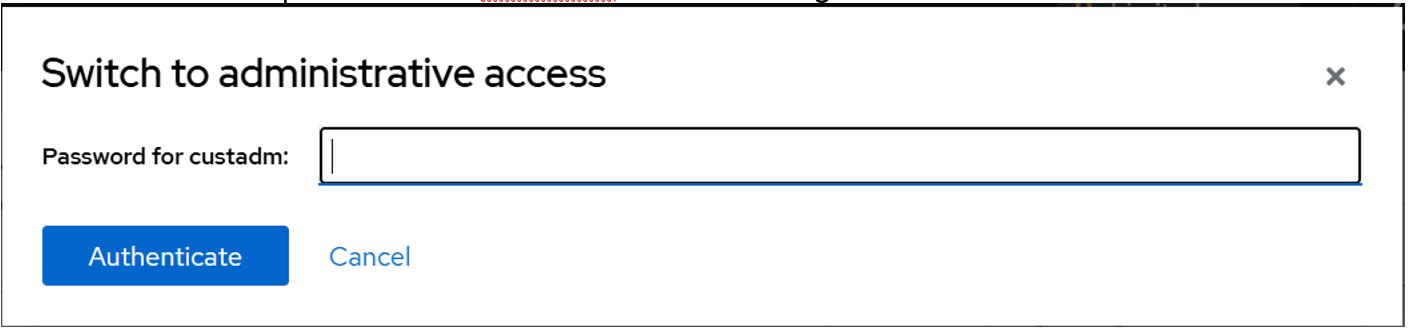 The Limited access button on the top-right of the window changes to Administrative access.
Figure: Administrative access button 
- Navigate to .
- View the information on the Storage Pools screen.
- Divide the amount of used and available space to get the percentage.
ADDITIONAL INFORMATION:In this example, approximately 18% of the available storage is used (579.51/3299 ~ 18%).
Figure: Example size 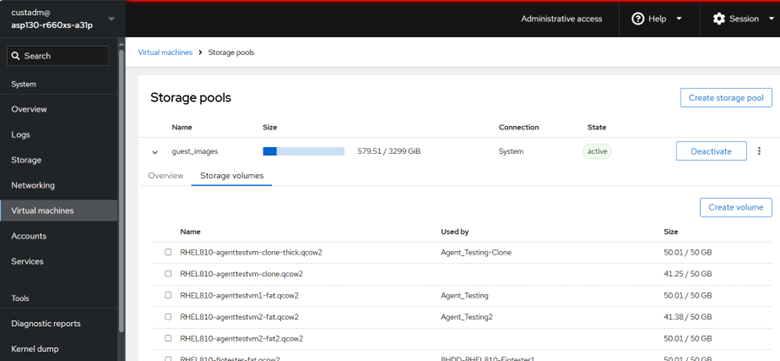
- Log in to the Avaya Solutions Platform Command Line Interface (CLI) as custadm.
- Change the directory to /var/lib/libvirt/images and identify the available space.
ADDITIONAL INFORMATION:In the example below, 18% of available storage is being used on the host.Example output:
[custadm@asp130-r660xs-a31p ~]$ cd /var/lib/libvirt/images
 [custadm@asp130-r660xs-a31p images]$ df -h .
 Filesystem                       Size    Used    Avail   Use%  Mounted on
 dev/mapper/vg_system-lv_libvirt  3.3T    580G    2.7T    18%   /var/lib/libvirt