

AVAYA DOCUMENTATION CENTER
Find answers to your technical questions and learn how to use our products
Deploying Avaya Aura® Device Services
LDAP advanced parameters
The following image shows the Advanced LDAP parameters menu in the Avaya Aura® Device Services Configuration Utility:
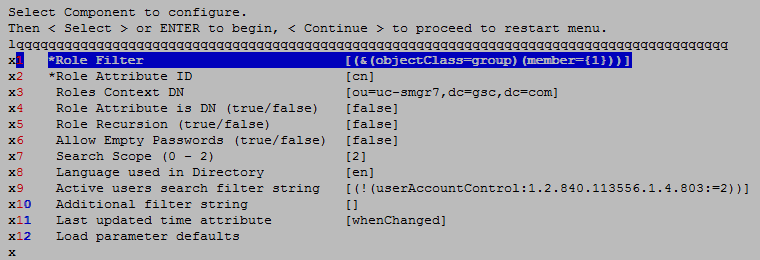
The following table describes the settings in the Advanced LDAP parameters menu:
|
Item name
|
Description
|
Equivalent properties file parameter
|
|---|---|---|
|
Role Filter
|
The string to use for role filtering. This is the mandatory setting.
The format of the string depends on the LDAP server configuration.
For example: (&(objectClass=group)(member={1}))
|
roleFilter
|
|
Role Attribute ID
|
The Role Attribute ID parameter has a different meaning, depending on the value of Role Attribute Is DN:
For example:
memberOf
This is the mandatory setting.
|
roleAttrID
|
|
Roles Context DN
|
The Roles Context DN to use for searching roles.
The roles search in LDAP is performed by using the Roles Context DN in combination with the Role Filter.
For example: ou=aadsusers,dc=example,dc=com
|
rolesCtxDN
|
|
Role Name Attribute
|
This parameter has a different meaning, depending on the value of Role Attribute Is DN:
For example: cn
|
roleNameAttrID
|
|
Role Attribute is DN (true/false)
|
The setting to determine if the role attribute is stored in the DN or in another object.
If you set this parameter to true, the role is stored in the attribute defined by the Role Name Attribute parameter.
If you set this parameter to false, the role attribute of the user contains the name of the role.
|
roleAttrIsDN
|
|
Role Recursion
|
The setting to enable or disable role recursion.
For example: the user jsmith can be in the Sales group, which can be in the AADS users group. In this case, Role Recursion must be set to true to permit role recursion.
|
roleRecursion
|
|
Allow Empty Passwords (true/false)
|
The setting to determine if empty passwords are allowed in the LDAP directory.
|
allowEmptyPasswords
|
|
Search Scope (0 - 2)
|
The setting to determine the scope of the role search.
The role search starts from the Role Context DN and uses the Role Filter. The search scope determines the depth of the search as follows:
|
searchScope
|
|
Language used in Directory
|
The language used in the LDAP directory.
The following languages are supported:
|
language
|
|
Active users search filter
|
The search filter string used to identify active users.
This field must only contain a filter to determine whether a user is active in LDAP. Do not use any other filters in this field.
If this setting is not configured, the Avaya Aura® Device Services User Management component handles all the users as active users.
For example: (!(userAccountControl:1.2.840.113556.1.4.803:=2)).
|
activeUsersFilter
|
|
Users search additional filter
|
The search filter that provides extended search options in addition to Active users search filter. If you want to search for users using additional criteria other than whether a user is active, provide that criteria in this field. This field has no default value.
For example, if you want to search for users in the object class userand the object category Person, use the following filter: (&(objectClass=user)(objectCategory=Person)).
|
—
|
|
Last updated time attribute
|
The attribute indicating the last time an LDAP object was modified, in the ASN.1 Generalized Time Notation.
The Avaya Aura® Device Services User Management component uses this attribute to identify updated users when synchronizing the user data with the LDAP server.
Avaya recommends that you use the following values:
If this parameter is not configured, the User Management component compares the data of every user to the data that exists in the LDAP server.
Note:
Configuring this parameter improves the efficiency of the user synchronization process and reduces the traffic between the Avaya Aura® Device Services server and the LDAP server during user synchronization.
|
lastUpdatedTimeAttr
|
|
Load parameter defaults
|
The script to load the default values for the parameters.
|
—
|