

AVAYA DOCUMENTATION CENTER
Find answers to your technical questions and learn how to use our products
Deploying Avaya Aura® Device Services
Enabling the Enhanced Access Security Gateway from the CLI
Use this procedure to enable Enhanced Access Security Gateway (EASG) functionality in Avaya Aura® Device Services. Avaya support engineers can use this functionality to access your computer and resolve product issues in real time.
- Open the SSH console as an administrator.
- Run the following command to check the EASG status:
ADDITIONAL INFORMATION:
EASGStatusADDITIONAL INFORMATION:By default, the EASG status is disabled. - Run the following command to enable EASG:
ADDITIONAL INFORMATION:
sudo /usr/sbin/EASGManage --enableEASG - Run the following command to verify the product certificate:
ADDITIONAL INFORMATION:
sudo EASGProductCert --certInfoSTEP RESULT:Avaya Aura® Device Services displays the product certificate details.For example: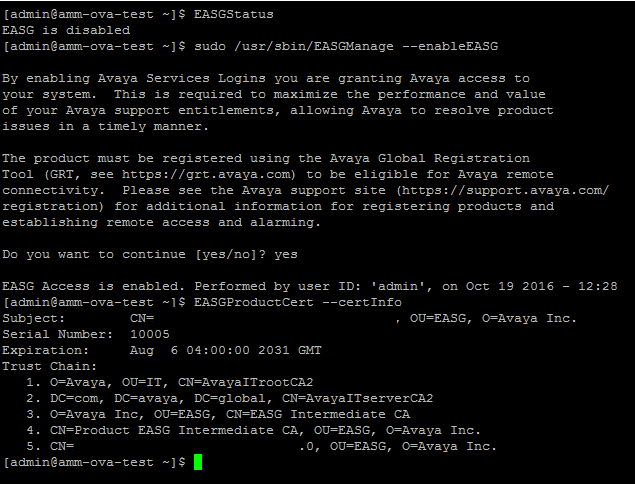 If the certificate expires within 360, 180, 30, or 0 days, Avaya Aura® Device Services writes a certificate expiry notification to the /var/log/messages log file.