

AVAYA DOCUMENTATION CENTER
Find answers to your technical questions and learn how to use our products
Configuring Avaya Contact Center Artificial Intelligence for Avaya Experience Platform™ Public Cloud
Rich media for the messaging channel
Avaya Contact Center Artificial Intelligence supports rich media responses with Google Dialogflow for self-service messaging interactions. Rich media responses achieve a higher completion rate for self-service queries compared to plain text.
Rich media types supported by Avaya Contact Center Artificial Intelligence
The following table describes the rich media types Avaya Contact Center Artificial Intelligence supports:
Rich Media Type |
Description |
|---|---|
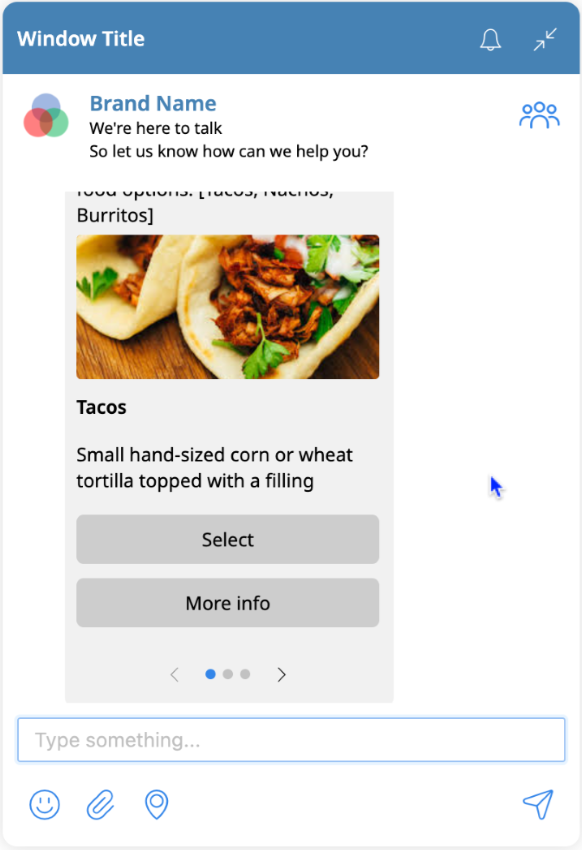
Carousel |
A carousel is a collection of tiles a customer can scroll to select. Carousels support web links and the selected tile opens in a web browser. Carousels also support action buttons. |
Emoticon |
Supports sending Unicode emoticons in text responses or any text field in a custom payload response. |
File |
Supports file attachment responses. When the customer clicks on the file, they can download and open it. |
Image |
Supports sending images. |
Link |
Supports web link responses. |
Location |
Sends a location using Google Maps. |
Location request |
A location request asks the customer to share their current location using Google Maps. |
Reply |
A reply is a quick-response format containing buttons for the customer to select. This rich media response type can minimize the time it takes for the customer to respond effectively. |
The following is a screenshot of an example carousel digital interaction:
Custom payload formats for rich media
You can use the following custom payload examples for the corresponding rich media type. Replace the example URLs and images with your own.
Enter the code in Google Dialogflow in .
For more information on sending asynchronous messages, see the developer's portal at https://developers.avayacloud.com/avaya-experience-platform/reference/senddigitalasyncmessage.
Carousel
{
  "body": {
    "payload": {
      "items": [
        {
          "actions": [
            {
              "payload": "TACOS",
              "type": "postback",
              "text": "Select"
            },
            {
              "uri": "https://en.wikipedia.org/wiki/Taco",
              "text": "More info",
              "type": "link"
            }
          ],
          "description": "Small hand-sized corn or wheat tortilla topped with a filling",
          "title": "Tacos",
          "mediaUrl": "https://example.com/example_tacos_image.jpg"
        },
        {
          "actions": [
            {
              "payload": "NACHOS",
              "type": "postback",
              "text": "Select"
            },
            {
              "uri": "https://en.wikipedia.org/wiki/Nachos",
              "text": "More info",
              "type": "link"
            }
          ],
          "description": "Heated tortilla chips or totopos covered with melted cheese",
          "title": "Nachos",
          "mediaUrl": "https://example.com/example_nachos_image.jpg"
        },
        {
          "actions": [
            {
              "payload": "BURRITOS",
              "type": "postback",
              "text": "Select"
            },
            {
              "uri": "https://en.wikipedia.org/wiki/Burrito",
              "text": "More info"
              "type": "link",
            }
          ],
          "description": "Small hand-sized corn or wheat tortilla topped with a filling",
          "title": "Burritos"
          "mediaUrl": "https://example.com/example_burritos_image.jpg"
         },
      ]
    },
    "elementText": {
      "text": "[carousel]: Please select from the food options: [Tacos, Nachos, Burritos]",
      "textFormat": "PLAINTEXT"
    },
    "elementType": "carousel"
  }
}
Emoticon
😀🏈🤖👍👊🥇👍File
{
  "attachments": [
    {
      "name": "example_file.pdf",
      "contentType": "application/pdf",
      "url": "https://example.com/example_file.pdf",
      "size": 1024248
    }
  ],
  "body": {
    "elementText": {
      "textFormat": "PLAINTEXT",
      "text": "Sharing pdf document: https://example.com/example_file.pdf"
    },
    "elementType": "file",
    "payload": {
      "mediaUrl": "https://example.com/example_file.pdf"
    }
  }
}
Image
{
  "attachments": [
    {
      "contentType": "image/jpeg",
      "size": 88316,
      "name": "image.jpg",
      "url": "https://example.com/example_image.jpg"
    }
  ],
  "body": {
    "elementType": "image",
    "elementText": {
      "text": "Optional sample text with image - https://example.com/example_image.jpg",
      "textFormat": "PLAINTEXT"
    },
    "payload": {
      "mediaUrl": "https://example.com/example_image.jpg"
    }
  }
}
Link
{
  "body": {
    "elementText": {
      "textFormat": "PLAINTEXT",
      "text": "Check out this link: [Add to Cart] [Learn More] https://example.com"
    },
    "elementType": "text",
    "payload": {
      "text": "More info:",
      "actions": [
        {
          "payload": "VC_ADD_TO_CART",
          "type": "postback",
          "text": "Add to Cart"
        },
        {
          "type": "link",
          "uri": "https://example.com",
          "text": "Learn more ..."
        }
      ]
    }
  }
}
Location
{
  "body": {
    "elementType": "location",
    "elementText": {
      "textFormat": "PLAINTEXT",
      "text": "Here is the nearest office location."
    },
    "payload": {
      "coordinates": {
          "lat": 40.7684355,
          "long": -74.5013142
      },
      "location" : {
        "address": "350 Mt Kemble Ave, Morristown, NJ 07960, United States",
        "name": "New Office Site"
      }
    }
  }
}
Location request
{
  "body": {
    "elementText": {
      "text": "[Location request] Could you please share your location?",
      "textFormat": "PLAINTEXT"
    },
    "payload": {
      "actions": [
        {
          "text": "Send Location",
          "type": "locationRequest"
        }
      ],
      "text": "Could you please share your location?"
    },
    "elementType": "text"
  }
}
Reply
{
  "body": {
    "elementType": "text",
    "elementText": {
      "text": "Which one do you like better? - [Tacos] [Burritos]",
      "textFormat": "PLAINTEXT"
    },
    "payload": {
      "text": "Which one do you like better?",
      "actions": [
        {
          "text": "Tacos",
          "payload": "TACOS",
          "type": "reply",
          "iconUrl": "https://example.com/example_tacos_icon.png"
        },
        {
          "text": "Burritos",
          "payload": "BURRITOS",
          "type": "reply",
          "iconUrl": "https://example.com/example_burritos_icon.png"
        }
      ]
    }
  }
}
Custom payload response field descriptions
Payload fields
The following table describes the custom payload response:
Field |
Field type |
Description |
|---|---|---|
body |
Body |
The body element of the message. |
attachments |
Array of attachments |
The array of attachments of the message. |
Body
The following table describes the fields of the body element:
Field |
Field type |
Description |
|---|---|---|
elementType |
String |
The type of body element, such as carousel, image, file, and so on. |
elementText |
Element text |
The message text and format of the message body. |
payload |
Payload |
The rich media payload to render the message. The maximum size of this field is 4096 bytes. |
Element text
The following table describes the fields of the element text element:
Field |
Field type |
Description |
|---|---|---|
text |
String |
The message text. The maximum size of this field is 524288 bytes. |
textFormat |
String |
The message text format. For messaging applications, use "PLAINTEXT". |
Payload
The following table describes the fields of the payload element:
Field |
Field type |
Description |
|---|---|---|
mediaURL |
String |
The URL of the media file. This field supports only HTTPS URLs. |
actions |
Array of actions |
An array of action buttons. |
items |
Array of items |
An array of carrousel items. |
coordinates |
Coordinates |
The coordinates of a location. |
location |
Location |
The information about a location, such as the name and address. |
Action
The following table describes the fields of the action element:
Field |
Field type |
Description |
|---|---|---|
type |
String |
The type of action button. The supported types are "link", "reply", "postback", and "locationRequest". |
text |
String |
The action button text. |
payload |
String |
The payload or command of "postback" or "reply" action buttons. |
uri |
String |
The URL the clients use when the "link" action button is clicked. This field supports only HTTPS URLs. |
iconURL |
String |
The URL of the icon image to display on a "reply" action button. This field supports only HTTPS URLs. |
Item
The following table describes the fields of the item element:
Field |
Field type |
Description |
|---|---|---|
title |
String |
The title of the item. |
description |
String |
The description of the item. |
mediaURL |
String |
The URL of the image to display on the item. This field supports only HTTPS URLs. |
actions |
Array of actions |
An array of action buttons. |
Coordinates
The following table describes the fields of the coordinates element:
Field |
Field type |
Description |
|---|---|---|
lat |
Double |
The latitude of the location. This value is between -90 to 90. |
long |
Double |
The longitude of the location. This value is between -180 to 180. |
Location
The following table describes the fields of the location element:
Field |
Field type |
Description |
|---|---|---|
name |
String |
The name of the location. |
address |
String |
The address of the location. |
Attachment
The following table describes the fields of the attachment element:
Field |
Field type |
Description |
|---|---|---|
name |
String |
The name of the attachment file. The maximum size is 256 bytes. |
contentType |
String |
The content type of the attachment. For more information on HTTP attachment content types, see https://developer.mozilla.org/en-US/docs/Web/HTTP/Basics_of_HTTP/MIME_types/Common_types. |
url |
String |
The URL of the attachment. This field supports only HTTPS URLs. The maximum size is 2048 bytes. |
size |
Integer |
The size of the attachment in bytes. |