

AVAYA DOCUMENTATION CENTER
Find answers to your technical questions and learn how to use our products
IP Office Embedded Voicemail Installation
Dial By Name
The Dial By Name feature can be selected as an auto attendant option. Callers selecting this option are asked to dial the name they require and then press #. The recording name prompts of matching users are then used to allow the caller to make their selection.
The name order (First then last or Last then first is set by the Dial By Name Match Order setting in the auto attendant on the Auto Attendant tab.
The name used for matching is taken from the user's configuration within the IP Office configuration. The Full Name is used if set, otherwise the Name is used.
Users are excluded from Dial By Name if they:
Are marked as Ex Directory () in the IP Office configuration.
Do not have a recorded mailbox name prompt. They can record their own name by dialing *05 after accessing their mailbox.
The Dial By Name feature assumes that a standard ITU lettered dialing pad is being used.
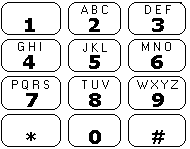
How Dial By Name works
The caller gets a prompt to dial the name they require and then press #.
For example, dialing 527 matches names starting with JAS (for example
Jason
) and KAR (for exampleKarl
).Callers can also press *# to exit without making a selection.
If no matches are found, the caller is given the option to retry.
If 10 or less matches are found, the matching mailbox name greetings are played as part of a selection list.
For example, Press 1 for …, Press 2 for …, Press 3 for …, etc.
If more then 10 matches are found, the caller is prompted to either press # to hear the first 10 matches or to dial more characters to reduce the number of matches. If they select to play the list, after each set of 10 matches they can either make a selection or follow the prompts for other options.