

AVAYA DOCUMENTATION CENTER
Find answers to your technical questions and learn how to use our products
IP Office Embedded Voicemail Installation
Routing incoming calls to an auto attendant
About this task
You can specify an auto attendant as a destination in the IP Office Incoming Call Routes table. Internal callers can access an auto attendant through a programmed DSS button or Phone Manager speed dial.
Procedure
- In the Destination drop-down box, select the auto attendant.
The names of the configured auto attendants are shown prefixed with AA:.
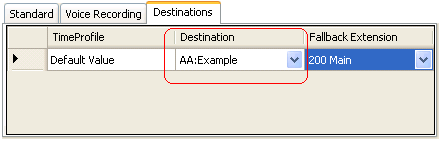
In this example, the Fallback Extension has also been set to route calls to a hunt group. The Fallback Extension setting is used for callers in the auto attendant who do not make a valid key press within the auto attendant's Maximum Inactivity time.
Using time profiles, you can add additional destination sets to use the auto attendant at certain times of day or to use different auto attendants at different times.