

AVAYA DOCUMENTATION CENTER
Find answers to your technical questions and learn how to use our products
IP Office Embedded Voicemail Installation
Recording Caller Consent
In some scenarios, you may want to prompt the user as to whether they consent to an action or requirement. It may also be a requirement to keep a record of the caller's consent.
When using embedded voicemail, this can be done using the Consent Directive settings of each auto-attendant action. These cause a consent value to be included in the system's SMDR output for the call (0 = consent not requested, 2 = consent given, 6 = consent denied). The consent value is also included in available to the system's DevLink3 CTI output.
Example
The customer has a sales group. If the group is busy, they want to give callers the chance to leave their address details and have someone get in touch later. However, local laws require them also log that the caller consented to the company having a record of caller's address information.
In the system configuration, they have setup 2 sales groups with the same members:
One group is configured with voicemail enabled to answer calls if no agent answers in a reasonable time. That mailbox prompts the caller to leave their contact information and an agent will contact them.
The other group is configured with voicemail disabled.
An auto-attendant has been created for the sales team calls. The menu actions prompt informs callers
If you are okay with us recording your address and contact details if any agent cannot answer immediately, press 1 and we will contact you. If otherwise, press 0. Note however that we may have to drop calls if our agents are all busy.
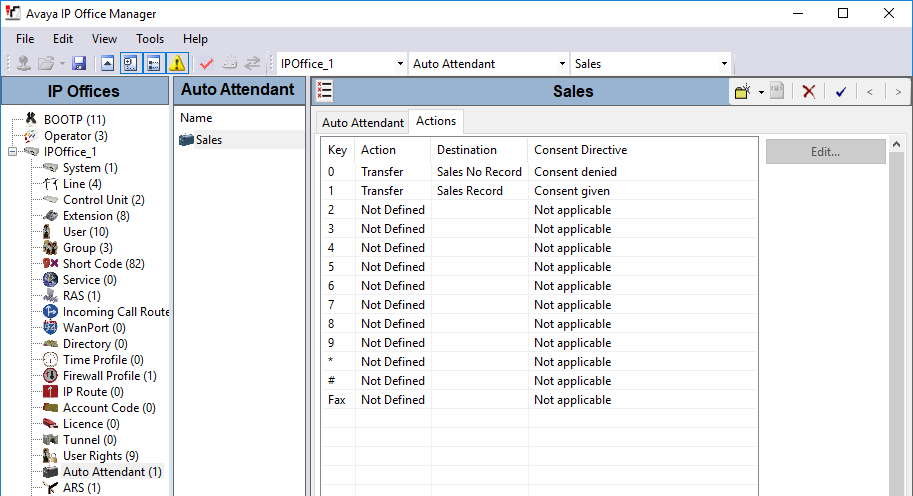
The two actions, keys 0 and 1, have been configured to transfer to the caller to the appropriately configured groups.
The incoming call route for sales calls has its Destination set to AA:Sales.