

AVAYA DOCUMENTATION CENTER
Find answers to your technical questions and learn how to use our products
Deploying MS Teams Direct Routing with IP Office
Tracing SIP Calls on the ASBCE
Use the following process to obtain SIP traces from the ASBCE.
- Open an SSH command line session to the SBCE_HA(Primary) IP address.
- Enter the command login as
ipcsand enter the ipcs user password when requested. - Enter the command
[ipcs@SBCE ~]$ su -and enter the root password when requested. - Check that the cursor is now prefixed with
[root@SBCE ~]. - Enter the command
traceSBC. - Press S to start setting up the trace capture.
ADDITIONAL INFORMATION:
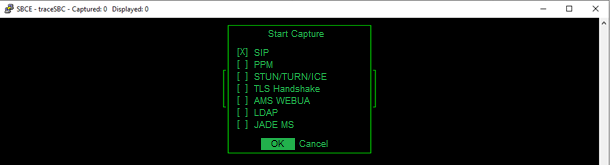
- Using the space and cursor keys, select SIP.
- Select OK and press enter. The trace shows the current SIP activities.
ADDITIONAL INFORMATION:
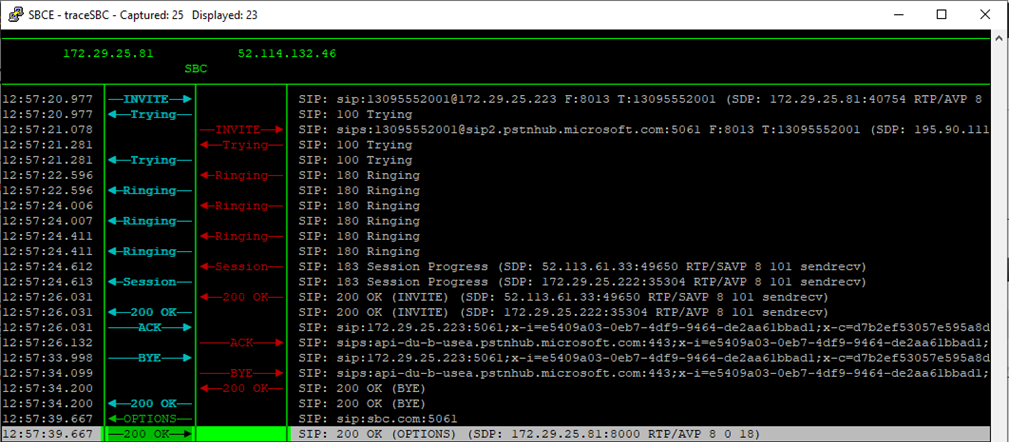
- Run the call scenarios which you want traced.
- When completed, press Q to quit tracing.
- The screen displays the details of the saved trace log file. Note the details.
ADDITIONAL INFORMATION:

Next steps