

AVAYA DOCUMENTATION CENTER
Find answers to your technical questions and learn how to use our products
Deploying MS Teams Direct Routing with IP Office
Create a URI Group for IP Office Extensions
In scenarios such as call transfers, MS Teams can send a REFER with an IP Office extension number and the MS Teams domain. You need a URI group to match that traffic. The ASBCE uses the URI group to redirect those calls back to the IP Office.
Before you begin
- Select Configuration Profiles and then URI Groups.
- Click Add and set a unique descriptive name for the URI group.
- Click Add and define the string that should trigger a match.
- Repeat the steps above for any other extension number patterns required.
- Click Finish.
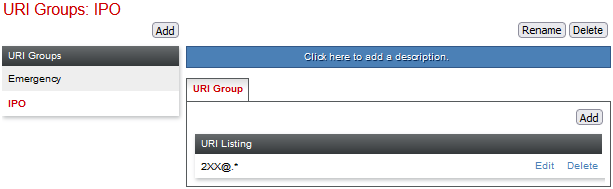
- The URI group details will look like the following example:
ADDITIONAL INFORMATION:
-
For the example scenario, IP Office extensions use the range 200 to 299. MS Teams only extensions use the range 400 to 499. Therefore, the URI Group only needs an entry for the IP Office range.
-
Next steps
-
Proceed to Define a SIP Call Routing Profile for MS Teams.