

AVAYA DOCUMENTATION CENTER
Find answers to your technical questions and learn how to use our products
Deploying MS Teams Direct Routing with IP Office
Adding the ASBCE to MS Teams
This process configures the SIP connection from MS Teams to the Avaya ASBCE used by the IP Office.
- Login to the MS Teams admin portal at https://admin.teams.microsoft.com/direct-routing/v2
- Select Voice and then Direct Routing.
- Select the SBCs tab and select Add.
ADDITIONAL INFORMATION:
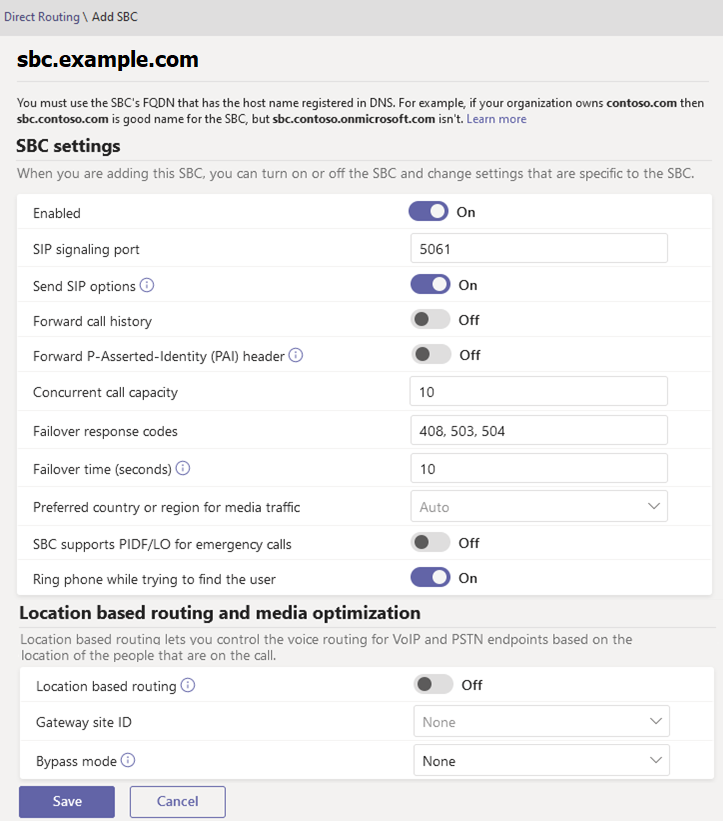
- Enter the FQDN of the ASBCE. If the domain used in the FQDN is not already one verified by Microsoft (see Verify the SBC Domain), follow the instructions displayed by MS Teams after adding the SBC entry.
- Enable the SBC and set the SIP signaling port to 5061.
- Ensure that the Concurrent call capacity matches the Max Calls setting of the IP Office MS Teams line. See Adding an MS Teams Line.
- Click Save.
Next steps
-
Proceed to Creating Dial Plans.