

AVAYA DOCUMENTATION CENTER
Find answers to your technical questions and learn how to use our products
Deploying MS Teams Direct Routing with IP Office
Define the MS Teams Server Interworking Profile
The ASBCE uses this interworking profile to support the SIP connection from MS Teams.
Before you begin
- Select Configuration Profiles and then Server Interworking.
- Click Add.
- For the Profile Name, enter a unique descriptive name and click Next.
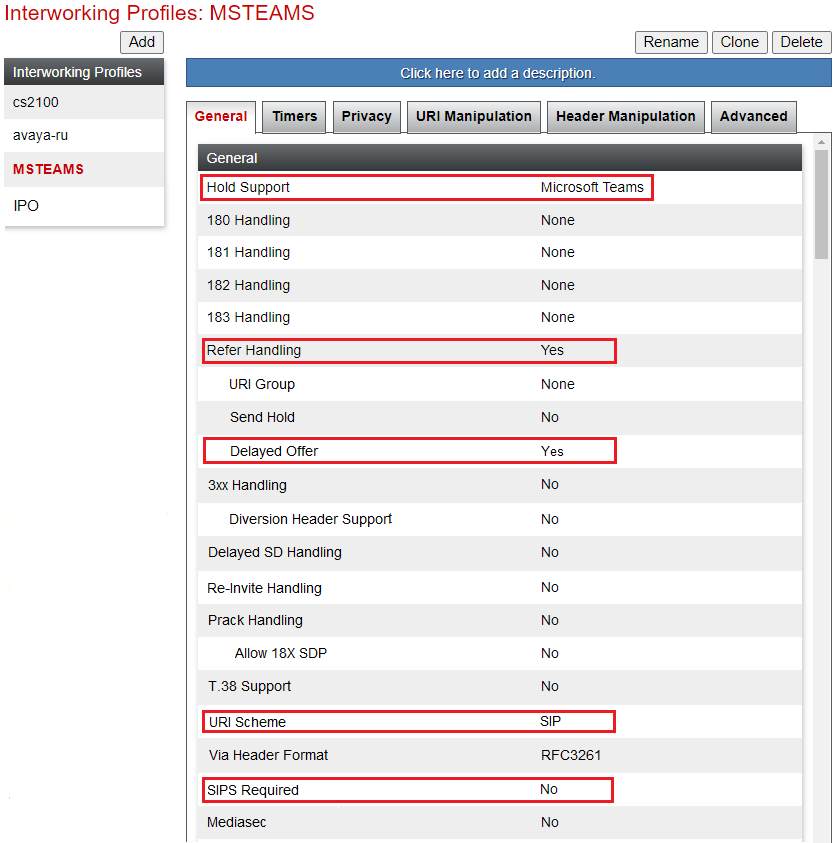
- On the General settings tab, change the following settings:
- Set the Hold Support to Microsoft Teams.
- Set the Refer Handling to Yes.
- Set the Delayed Offer to Yes.
- Set the URI Scheme to SIP.
- Set SIP Required to No.
- Click Next. Leave the SIP Timers unchanged. Click Next.
- Leave the Privacy settings unchanged. Click Next.
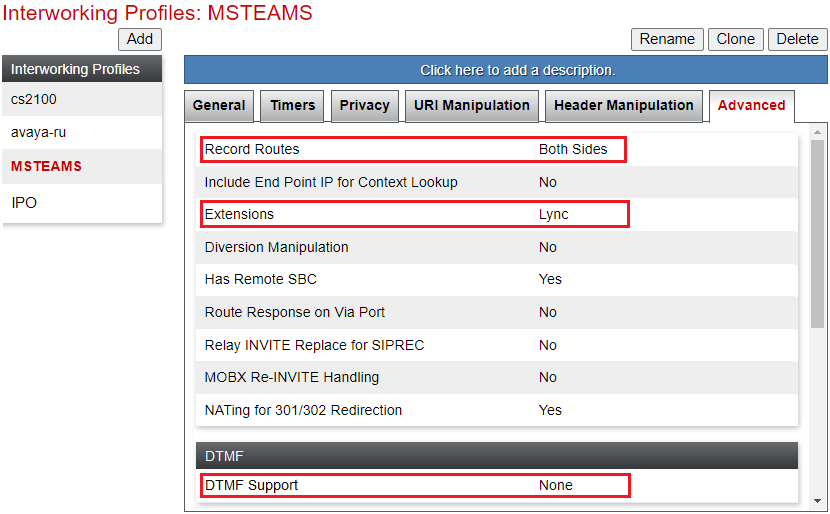
- On the Advanced settings tab, change the following:
- Set Record Routes to Both Sides.
- Set Extensions to Lync.
- Set DTMF Support to None.
- Leave all other tabs at their default values. Click Finish. The MS Teams interworking profile will look like to the following example:
ADDITIONAL INFORMATION:
Next steps
-
Proceed to Create a TLS Client Profile for the IP Office.