

AVAYA DOCUMENTATION CENTER
Find answers to your technical questions and learn how to use our products
Deploying MS Teams Direct Routing with IP Office
Checking MS Teams User Numbers
Use the following process to check that the Office phone numbers set for users in Azure Active Directory. MS Teams uses this number as the user's Phone number.
- Login to the MS Teams admin portal at https://admin.teams.microsoft.com/user.
- If necessary, select User.
- MS Teams displays the list of users, including their MS Teams telephone numbers.
ADDITIONAL INFORMATION:
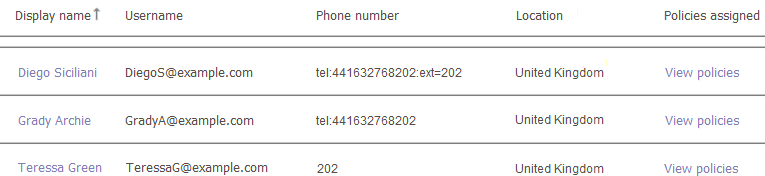
- Verify that the Phone number is correct. For more information, see Telephone and Extension Numbers.
ADDITIONAL INFORMATION:NumberExample MS Teams FormatTelephone Number and Extension
tel:441632768202;ext=202Telephone Number onlytel:441632768202Extension Number only202