

AVAYA DOCUMENTATION CENTER
Find answers to your technical questions and learn how to use our products
Deploying MS Teams Direct Routing with IP Office
Configure Topology Hiding for the IP Office
The ASBCE uses topology hiding to modify the content of SIP headers. It uses this for two main roles:
-
As a security feature to preventing sending private enterprise network information to the public network.
-
As an interoperability tool to adapt the headers to the IP addresses or domains expected by the remote the service provider or enterprise networks.
Before you begin
- Select Configuration Profiles and then Topology Hiding.
- Select the default profile and click Clone.
- Enter a unique descriptive name for the profile for connections to the IP Office and click Next.
- Using the Add Header option, add the following settings. For those headers set to Overwrite, use the IP Office system's SIP domain.
ADDITIONAL INFORMATION:
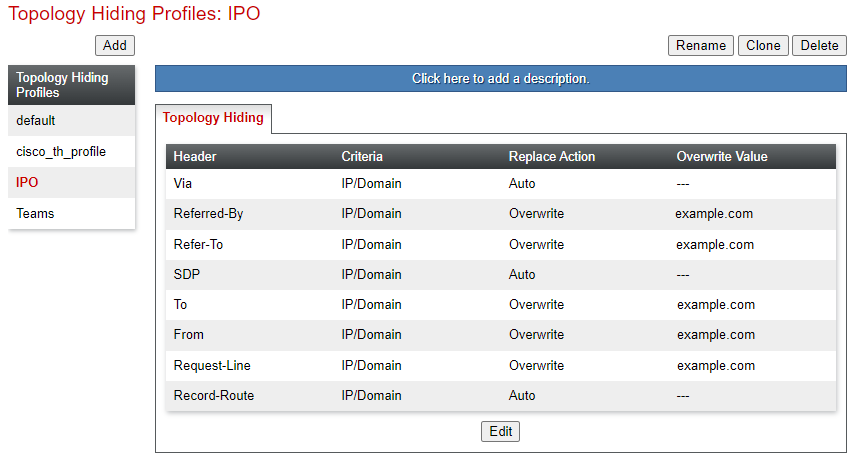
- Click Finish.
Next steps
-
Proceed to Configure Topology Hiding for MS Teams.