

AVAYA DOCUMENTATION CENTER
Find answers to your technical questions and learn how to use our products
Deploying MS Teams Direct Routing with IP Office
Adding an MS Teams Line
The MS Teams line links the IP Office to the ASBCE required for direct routing.
This document assumes that you have already configured the IP Office system to support SIP trunks.
- Using IP Office Manager or IP Office Web Manager, access the IP Office system configuration.
- Select Line or .
- Click Add and select MS Teams Line. If using IP Office Web Manager in a Server Edition network, also select the server to which you want to add the line. Click OK.
- On the MS Teams tab, configure the number of calls:
ADDITIONAL INFORMATION:
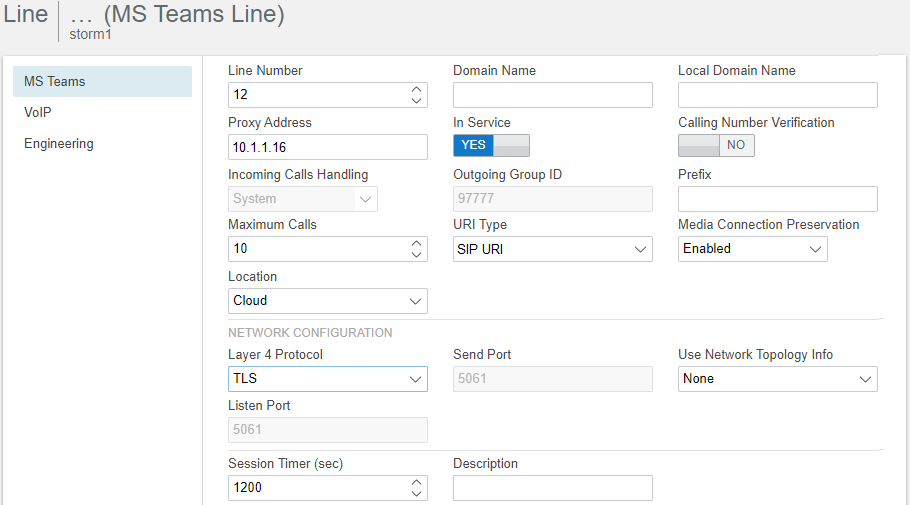
- Set the Proxy Address to the IP Address of the ASBCE interface (A1 or A2).
- Ensure that the Max Calls value matches the Concurrent call capacity of the ASBCE entry in MS Teams.
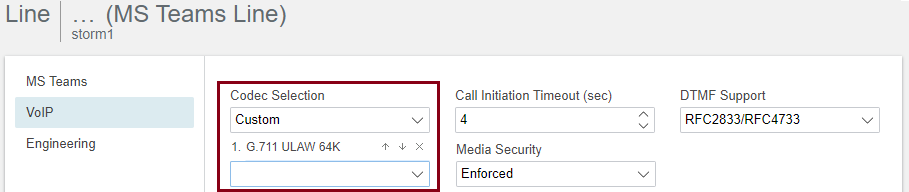
- On the VoIP tab, ensure you have selected a single codec.
ADDITIONAL INFORMATION:
- Click Save or OK.
- If using IP Office Manager, save the configuration back to the IP Office system.
Next steps
-
Proceed to Verify the SBC Domain.