

AVAYA DOCUMENTATION CENTER
Find answers to your technical questions and learn how to use our products
Deploying MS Teams Direct Routing with IP Office
Adding the Identity Certificates to the ASBCE
You need to add the MS Teams and IP Office identity certificates to the ASBCE.
Before you begin
- Login to ASBCE web interface.
- Go to .
- Add the IP Office identity certificate:
- Click Install.
ADDITIONAL INFORMATION:
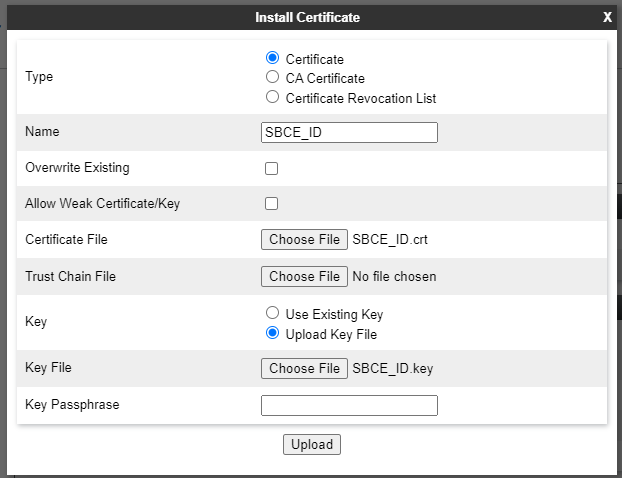
- Type - Select Certificate.
- Name - Enter a unique descriptive name for the certificate.
- Certificate File - Click Choose File and select the IP Office identity certificate.
- Trust Chain File - Leave this field empty.
- Key - Select Upload Key File.
- Key File - Click Choose File and select the private key file for the IP Office identity certificate.
- Click Upload.
- Click Install and then Finish.
- Click Install.
- Add the MS Teams identity certificate:
- Repeat the process for the MS Teams root certificate.
ADDITIONAL INFORMATION:
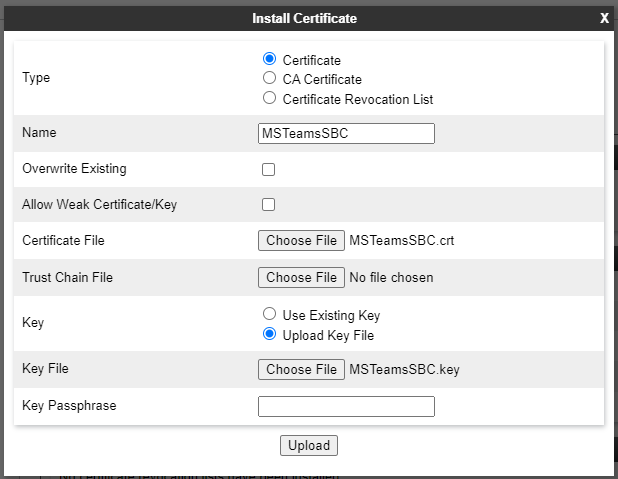
- Repeat the process for the MS Teams root certificate.
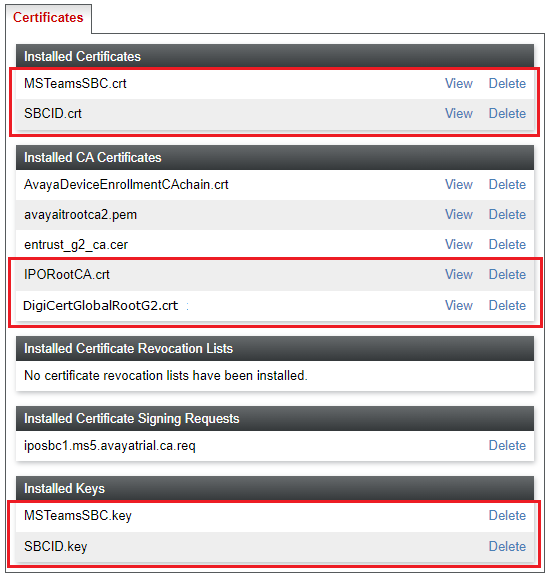
- Check that the certificates display now lists the 2 root certificates, 2 identity certificates and 2 certificate keys.
ADDITIONAL INFORMATION:
Next steps
-
Proceed to Configuring the ASBCE Callflow.